The turbo installation on the Del Sol is coming together, and before firing up the engine, I want a dash camera ready to record. You know, just in case.
But rather than installing another camera and calling it a day, I wanted to find out what actually goes into making one. So I traveled from Florida to Shenzhen, China, to follow the Vantrue E1 Pro through the manufacturing process, from loose plastic pellets and circuit boards to a sealed box ready to ship.
There is a lot packed into this little 4K dash camera. The really cool part is seeing how automated machinery, careful hand assembly, and repeated inspections turn all those individual pieces into something that works.
Key Takeaways
- Dash camera manufacturing combines molded housings, automated circuit board assembly, precision optics, and hands-on final assembly.
- Sensor quality and accurate lens focus affect useful image detail beyond the 4K resolution label.
- Thermal management includes supercapacitors, thermal paste, a heat sink, and ventilation within the compact housing.
- Every completed camera undergoes functional checks, Wi-Fi testing, and at least three hours of warm-room recording.
Table of Contents
- Before Manufacturing: Designing a Camera That Fits Together
- Step 1: Injection Molding the Plastic Parts
- Step 2: Building the Dash Camera’s Circuit Boards
- Step 3: Building the 4K Image Sensor and Lens Assembly
- Step 4: Assembling the Complete Dash Camera
- Testing: Making Sure the Finished Camera Actually Works
- Step 5: Packaging the Camera and Checking for Missing Parts
- Back to the Turbo Del Sol
Before Manufacturing: Designing a Camera That Fits Together
The process starts on a computer, not on the assembly line. Engineers use computer-aided design, or CAD, to arrange the internal components and make sure everything fits inside the compact housing.
Then they 3D print a prototype. That gives them a physical camera body to evaluate: the size, the screen location, the button layout, and how the whole thing feels in your hand. Once the design is approved, the production molds and hardware can be made.
Holding the prototype next to the finished camera makes that progression pretty obvious. What starts as a way to check the shape becomes the housing for a complete recording system.
Vantrue’s team includes more than 130 people across manufacturing, engineering, project management, and customer service. Before heading into production, one of the founders welcomed me with tea. This was my first trip to China, and that was a pretty nice way to start.
The manufacturing process breaks down into five main stages:
- Injection mold the plastic components.
- Populate and solder the circuit boards.
- Build the image sensor and lens assembly.
- Assemble and test the complete dash camera.
- Package the camera, accessories, and instructions.
Step 1: Injection Molding the Plastic Parts
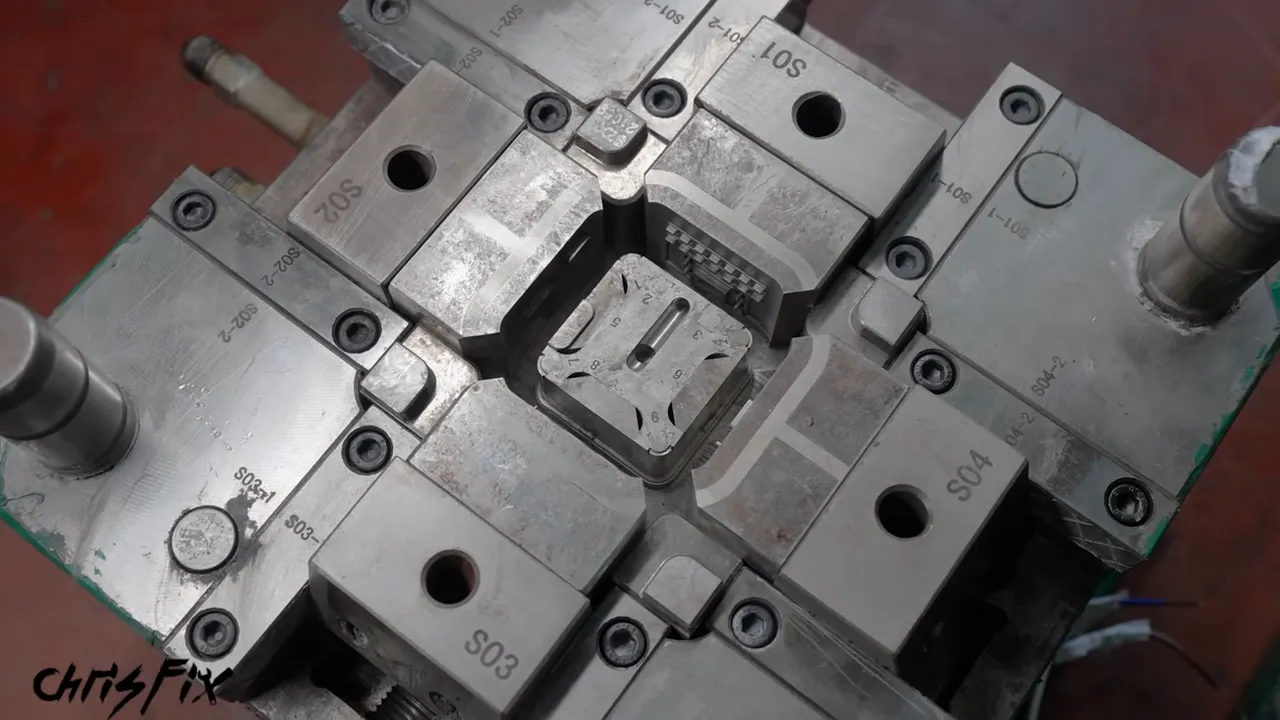
The camera housing needs openings for the memory card, buttons, connectors, and ventilation. All of those details begin with a precision mold.
And this is not some lightweight mold you pick up and carry across the room. The case mold weighs more than 300 pounds, so workers use a crane to move it into the injection molding machine. They carefully lower it into position, securely bolt down both sides, close the access door, and warm up the machine.
Why the Plastic Blend Matters
The raw material is a special blend of flame-retardant thermoplastic pellets. The mixture looks mostly light-colored before processing, but the finished molded components are black.
To show why the material matters, the factory compared regular ABS plastic with the flame-retardant version. The regular ABS continued burning after ignition, while the flame-retardant sample resisted sustained burning once the flame was removed.
Flame-retardant does not mean fireproof. The point is to reduce the housing’s tendency to keep burning during an extreme failure, not to promise that a camera can never be involved in a fire.
From Pellets to Finished Housings
A worker fills the machine’s hopper with pellets, and the molding cycle begins:
- The two sides of the mold press together.
- Molten plastic is injected into the mold cavities.
- The plastic cools enough to hold its shape.
- The mold opens, and a robotic arm removes the new part.
- The arm places the part on a conveyor for finishing.
The machines can repeat this process around the clock, but a freshly molded part still needs a little attention. A worker uses a polishing file to smooth small burrs or imperfections, blows off the dust, and places the finished housing in a tray.
That same basic process produces the other molded plastic pieces. Once they are finished, they head to the assembly area.
Step 2: Building the Dash Camera’s Circuit Boards
Inside this dash camera are four main circuit boards, each with a different job:
- Camera sensor board: Holds the Sony 4K image sensor and supports the lens assembly.
- LCD board: Runs the camera’s display.
- Power connector board: Provides the connection used to power the camera.
- Main board: Handles the processing and acts as the camera’s brain.
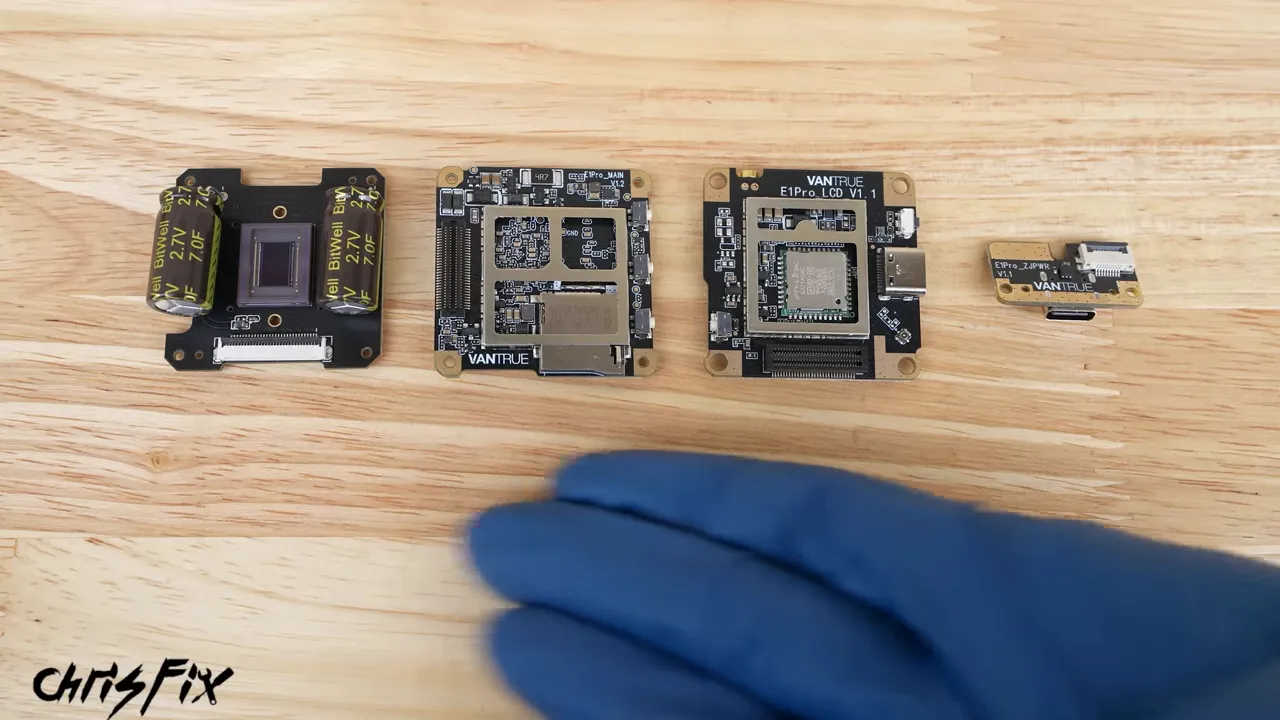
These boards go through a similar assembly process, so the main board is a good example to follow. The starting point is an unpopulated printed circuit board, or PCB. It already has its conductive pathways and component locations, but it does not yet have the chips and other parts installed.
Keeping Dust and Static Under Control
Before entering the PCB assembly room, everyone puts on special clothing to reduce the dust they shed. An air shower blows loose particles off that clothing, and you turn around so the air jets reach all sides.
Then everyone touches a grounding post to discharge static electricity. Tiny electronic components can be damaged by electrostatic discharge, even when the discharge is not something you notice. The ESD Association’s explanation of electrostatic discharge provides more background on why electronics facilities take it seriously.
Applying Solder Paste Through a Stencil
A worker loads panels of bare boards into a rack, which feeds them into a solder paste screen printer. The machine checks the panel’s orientation and aligns it beneath a stencil.
A squeegee pushes solder paste across that stencil in one direction and then back again. Openings in the stencil let paste reach only the locations where components need solder connections.
The panel then moves through an inspection machine. Cameras check that the paste landed in the correct places before any components are added. Catching a problem here is much better than carrying it through the rest of production.
Placing Thousands of Tiny Components
Next are the pick-and-place machines. Their name describes exactly what they do: pick up a component and place it in its assigned spot on the board.
The machine demonstrated on this line places about 10 components every second, putting its hourly output in the tens of thousands. And one machine does not finish the entire main board. The panel travels through three more placement machines to receive all the required components.
After placement, another camera inspection checks that everything is present and positioned correctly.
Reflow Soldering and Final Inspection
At this point, the components are sitting in solder paste. To make the permanent connections, the panel travels through a roughly 20-foot convection reflow oven.
The oven operates at temperatures around 500°F, and the main-board panel takes about six minutes to travel through the heating and cooling process. The solder melts, forms the connections, and solidifies again. By the exit, the panel has cooled enough for a worker to handle.
There is a quick visual inspection, followed by a closer inspection of the solder joints. The worker checks for smooth, uniform connections and verifies that the solder flowed where it needed to.
The boards are still joined together in panels at this stage. Separating them into individual pieces comes later.
Step 3: Building the 4K Image Sensor and Lens Assembly
The main board does the processing, but the sensor and lens are the heart of the camera. This is the assembly that produces the image, so it deserves a closer look.
The sensor board begins with the same solder paste printing and inspection process as the main board. The stencil is different because the component layout is different.
Not All 4K Sensors Produce the Same Image
This camera uses a Sony 4K sensor. The purpose is not just to produce a large image, but to capture useful detail with low noise, good low-light performance, and high dynamic range.
In the road comparison I made, the generic 4K camera produced a softer-looking image. The Sony-equipped camera showed more detail, and in the enlarged license plate example, the plate was more legible.
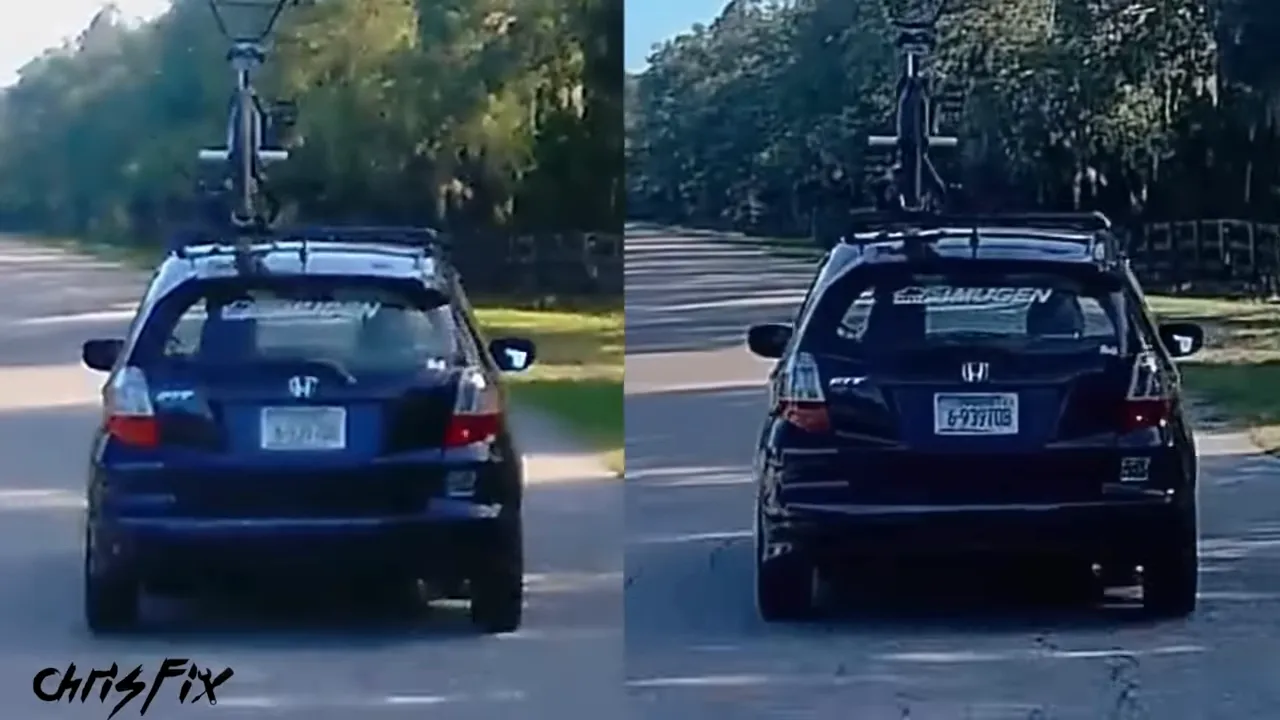
The 4K label alone does not tell you how much useful detail a dash camera will capture. This comparison demonstrates a difference in these examples, rather than a guarantee that every license plate will always be readable.
Protecting and Installing the Sensor
The Sony sensors arrive in sealed antistatic protective packaging with desiccant packs. Moisture can create problems during soldering, so protecting the components starts before they reach the machine.
A worker loads two trays of sensors into the pick-and-place machine. The trays fit securely side by side so the machine can pick each sensor accurately.
This board has fewer components than the main board. The placement machine installs the image sensor, the white ribbon cable connector, and the small supporting components. Then the panel travels through the reflow oven for just over five minutes at the stated oven temperature of around 500°F.
After automated scanning and another visual inspection, a worker uses a foot-pedal-operated hydraulic cutter to separate the panel along its seams. The other circuit board types are separated in the same way.
Installing, Focusing, and Locking the Lens
With the individual sensor board cut free, a worker blows off dust, removes the sensor’s protective cover, and positions the lens assembly.
At the next station, a jig holds the assembly while an electric screwdriver tightens two mounting screws to a specified torque. That helps keep the lens mount seated straight and evenly.
Then the camera comes to life for the first time. A ribbon cable connects it to a test system, and an image appears on the monitor. Initially, it is blurry.
The worker rotates the lens to bring a test chart into focus. Computer feedback confirms when the image is sharp enough, so this is not simply a judgment made by eye.
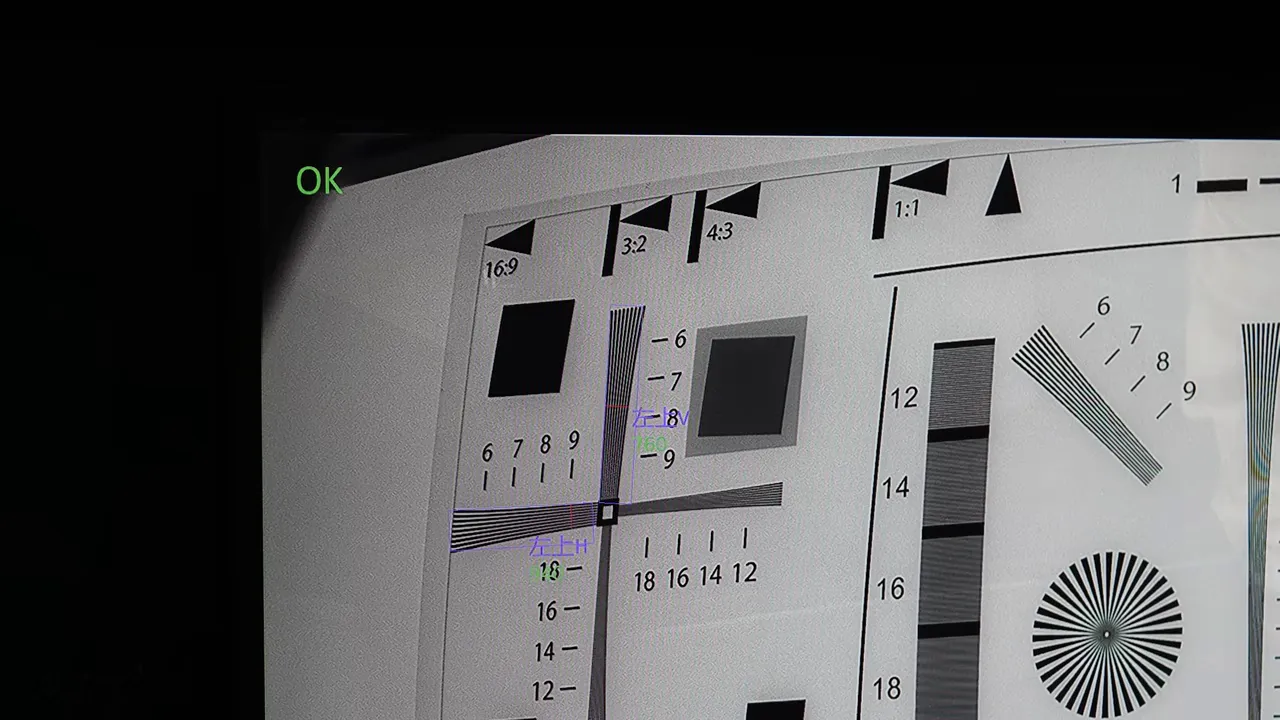
Once focus is correct, the assembly goes straight to a gluing station. A controlled amount of UV-curing adhesive is applied where the lens meets the barrel. There needs to be enough to lock the adjustment, but not so much that it runs onto the board.
The assemblies then go into a UV light chamber, where the adhesive hardens in seconds. That locks the focus in place.
Another test checks for dead pixels and dust on the sensor, either of which could leave visible defects in the recorded image.
Adding Supercapacitors Instead of a Battery
The final addition to this module is a pair of supercapacitors. This camera uses them instead of an internal battery, with heat reliability being a major reason for that choice.
A dash camera sits right against the windshield, exposed to sunlight and high cabin temperatures. Vantrue states that this camera is tested for sustained operation from approximately -4°F to over 140°F.
A worker positions the capacitors in a jig, solders their leads by hand, and clips the excess metal flush with the back of the board. Now the camera module is ready for final assembly.
Step 4: Assembling the Complete Dash Camera
Now all those separate pieces come together. Around 60 workers handle different stations on the assembly line, with the main assembly process taking under 30 minutes. The extended testing afterward takes considerably longer.
Buttons, Antenna, and Camera Connections
The line starts with the molded plastic housings. Workers plastic weld the orange emergency button into place, followed by the bottom control buttons.
The emergency button lets you protect a recording from deletion. The bottom buttons let you change settings directly on the camera without opening the phone app.
Next, a worker installs the Wi-Fi antenna. That connection lets a phone communicate with the camera to change settings or download footage.
Meanwhile, another station connects a ribbon cable to the camera module. Small spots of quick-drying glue secure the connector, insulating tape covers it, and metal mesh tape adds electromagnetic shielding.
The module goes into the front bezel, and its ribbon cable connects to the main board. That connector receives shielding tape as well.
Managing Heat Inside a Small Housing
A worker applies thermal paste to the main board’s heat-transfer area and places a heat sink on top. The heat sink is screwed down in a crisscross pattern to seat it evenly.
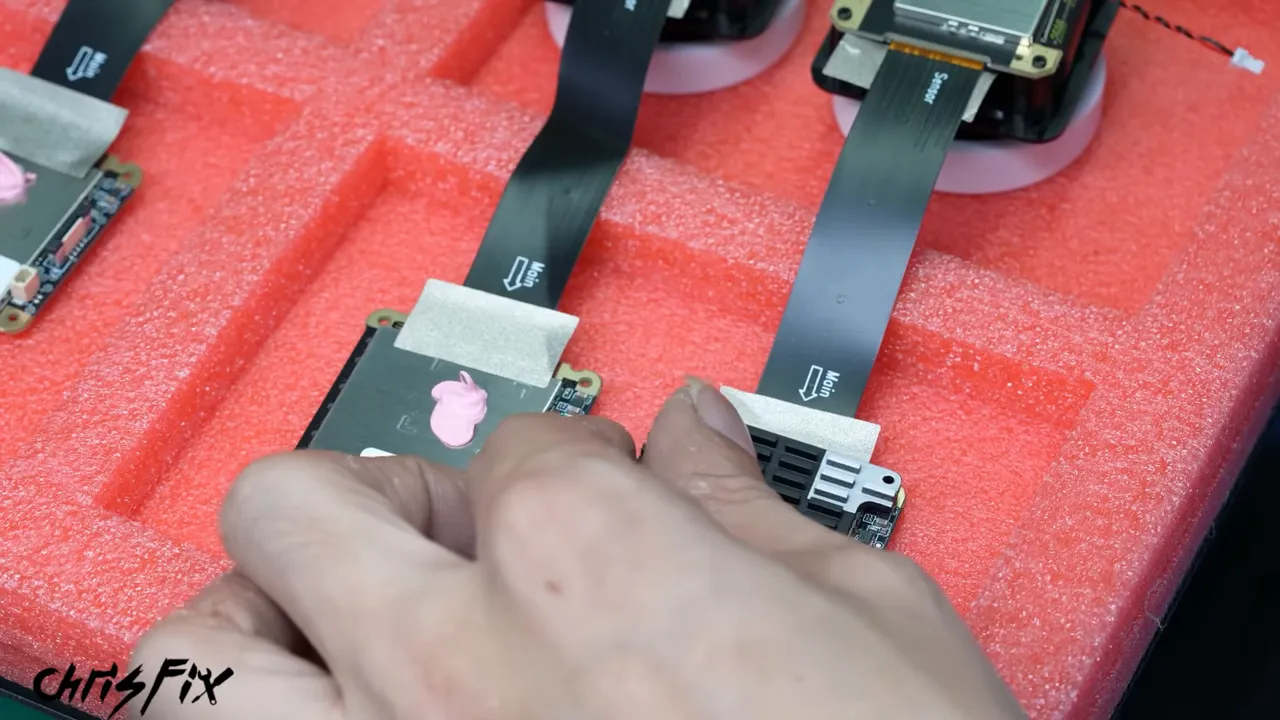
The main board assembly slides into the housing. Insulating material goes over the heat sink, and a small metal mesh sponge is added at an exposed corner to support heat transfer while allowing airflow through its structure.
The speaker wires plug into the board, and the front lens section clips into the housing with two distinct clicks. Now it is starting to look like a dash camera.
Installing the Display and Mount Connection
The LCD board connects to the Wi-Fi antenna and fits into the camera. An internal plastic support is installed and screwed down in a crisscross pattern, securing the internal parts.
The connector for the windshield mount goes on top and is also screwed into place. Then the LCD connects to its circuit board, its ribbon connection receives shielding tape, and the display fits into the back.
But the camera is not permanently sealed yet. The display is temporarily held with tape so the assembled unit can go through testing first.
Testing: Making Sure the Finished Camera Actually Works
The number of checks throughout production impressed me. Quality control is not just one person looking at a finished camera before it goes into a box.
Audio, Video, and Shock Detection
A worker attaches the mount, powers up the camera, and checks its functions, including audio and video recording.
Shock detection gets a very hands-on check: the worker strikes the table next to the camera to verify that it responds. This tests the function used to trigger recording after an impact in parking mode.
Wi-Fi Testing Without Outside Interference
At the next station, the camera goes inside a shielded enclosure. Closing the lid blocks outside Wi-Fi signals so the camera’s own wireless performance can be tested without interference from everything else nearby.
At Least Three Hours of Warm-Room Recording
This next test surprised me. Every camera is connected to power and left recording for at least three hours in a warm room.
During my visit, the room was around 34°C, or 93°F. It provides a warm operating environment, although it is not the same temperature as the camera’s stated maximum operating limit.
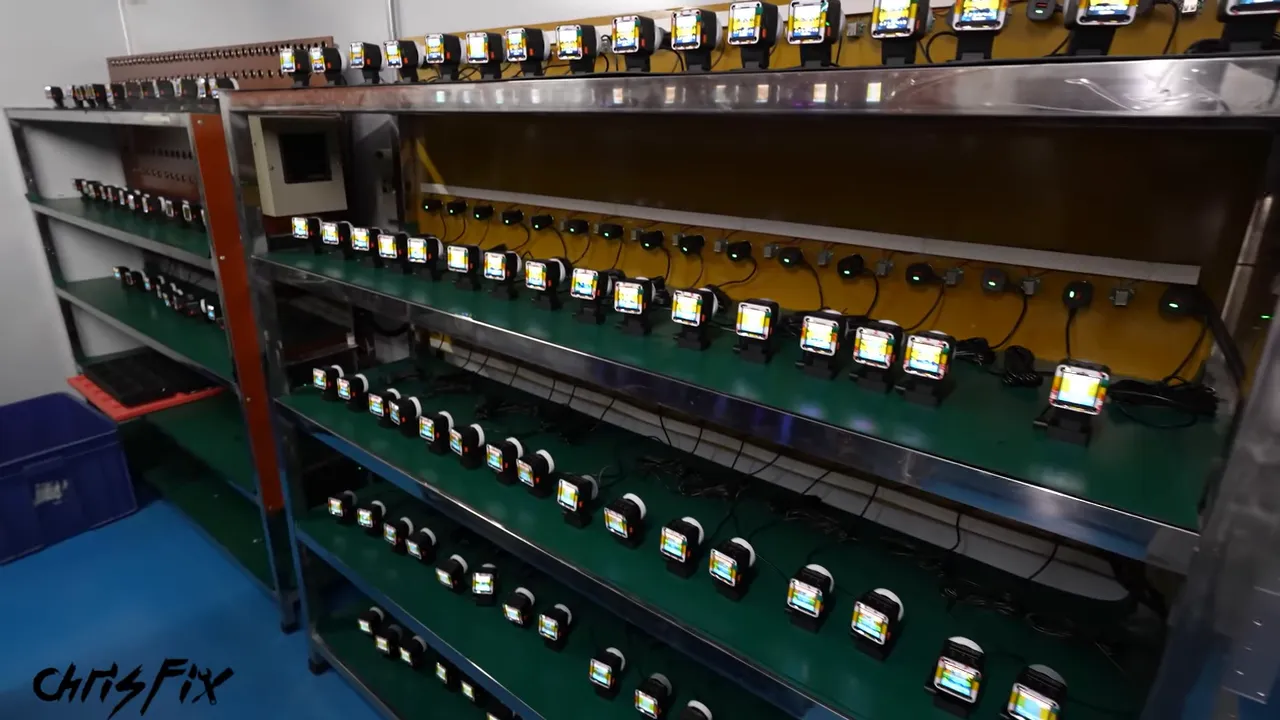
Vantrue explained that many of the failures it had identified occurred during the first hour of use. Running every camera longer than that is intended to catch early problems before shipping.
The room also provided a pretty cool demonstration of voice commands. Commands to take a photo, turn the screen off, and turn it back on worked across the assembled cameras.
Sealing the Display in a Cleaner Environment
After testing, the cameras return for their final display covers. This happens in a positive-pressure room to help limit dust entering the work area.
A worker removes the display’s temporary protective plastic and exposes the double-sided adhesive. The camera gets a blast of air to remove lingering particles, and the clear display cover is pressed into place.
That finishes the camera assembly. From here, it is ready for packaging.
Step 5: Packaging the Camera and Checking for Missing Parts
Even the packaging has its own inspection process. A worker checks each box for damage and printing defects before anything goes inside.
The contents are added in stages:
- Window stickers in the appropriate language for the destination market.
- Clear windshield mounting film and a microfiber towel.
- The power cable and included accessories.
- Protective foam to hold the camera during shipping.
- The cleaned camera, with protective film and quick-start information applied.
- A pamphlet, instruction manual, and app QR codes.
Before packing the camera, a worker cleans the screen to remove fingerprints and smudges. The camera then goes into a protective bag and into the foam insert.
I jumped into the line for one extra step and added ChrisFix keychains to a few hundred boxes. I also marked the specific camera we followed through production with my own sticker.
A Weight Check Before Sealing
Once the box is closed, it goes onto a scale. This camera package has a target weight of 590 grams.
Weight provides a quick check for packing mistakes. A package that is too light may be missing an item, while one that is too heavy may contain something extra.
After that, an anti-tamper sticker seals the box. A machine wraps it in plastic film, and hot air shrinks the film tightly around the packaging. One final visual inspection checks that everything looks complete.
And that is it: plastic pellets, electronic components, and a lens have become a finished 4K dash camera, boxed and ready to ship. How cool is that?
Back to the Turbo Del Sol
Back home, the plan is to install this camera in the Del Sol and finish up the turbo project. The car finally got its long-awaited test drive, and hearing it pull under boost was a pretty exciting payoff.
The factory trip gave me a whole different appreciation for the little camera going into the car. Its housing, solder joints, lens focus, heat sink, wireless connection, and packaging all passed through separate processes and checks.
Vantrue made that access possible, including pausing production at different stations so I could get close enough to show the details. Seeing the entire process, from the first molded part to the final sealed box, was worth the trip.
|


