A bad hybrid battery does not have to mean the end of a good Prius. My 2013 Prius cost $2,700 because its battery was failing, and a local dealership quoted $4,600 to replace it. Instead, I installed a new aftermarket battery kit for about $2,200 and reused the original battery housing and electronics.
This repair covers the Generation 3 Prius, model years 2010 through 2015. It includes diagnosing the failure, removing the interior, taking out the battery, replacing the old modules with cylindrical battery assemblies, and putting everything back together. Most of the mechanical work uses common hand tools, but organization, accurate torque settings, and high-voltage safety are essential.
The finished car ran smoothly, had no remaining trouble codes after the test drive, and returned excellent fuel economy. Beautiful! But before buying any parts, we need to make sure the battery really is the problem.
What You'll Learn
- Confirm battery failure with hybrid-system fault codes before purchasing replacement parts.
- Removing the service plug interrupts the circuit but does not eliminate stored energy inside the battery.
- Keep the replacement assemblies in order and follow the kit’s wiring and torque specifications.
- Clean the battery filter and inspect the cooling fan to protect the replacement pack.
Table of Contents
- Confirm That the Hybrid Battery Is Failing
- Choose a Replacement Battery and Gather Your Tools
- High-Voltage Safety Comes Before Disassembly
- Remove the Cargo Trim to Reach the Battery
- Clean the Battery Air Filter While You Have Access
- Remove the Rear Side Panel Without Breaking Its Clips
- Disconnect the Battery From the Car
- Unbolt and Remove the Battery Assembly
- Disassemble the Original Battery Pack
- Install the New Cylindrical Battery Assemblies
- Connect the Busbars, Voltage-Sensing Wires, and Main Cables
- Reinstall the Temperature Sensors and Battery Lid
- Inspect the Cooling Fan Before Installing the Battery
- Install the Rebuilt Battery in the Prius
- Test the Battery Before Reinstalling All the Trim
- Reinstall the Ducts and Interior Panels
- Torque Settings Used in This Repair
- Test-Drive Results and Total Repair Cost
Confirm That the Hybrid Battery Is Failing
The first clue on this Prius was a Check Hybrid System message on the dashboard. Fuel economy had also dropped to roughly 30 MPG.
Neither symptom alone is a complete diagnosis. Connect an OBD-II scanner capable of reading Toyota hybrid-system codes to the diagnostic port beneath the steering wheel, then scan the vehicle.
Here are the important codes I found:
- P0A80: Replace hybrid battery pack.
- P3011: Battery block 1 is weak.
- P3013: Battery block 3 is weak.
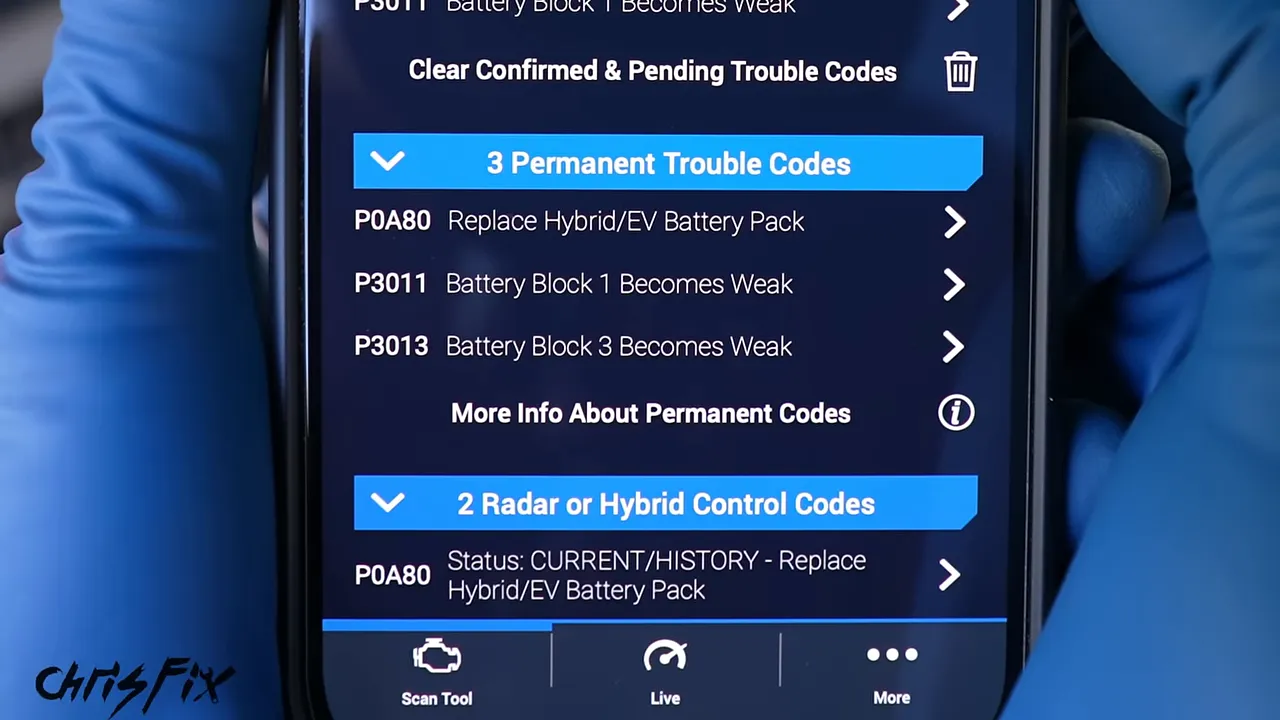
The combination of a battery replacement code and specific weak-block codes gave me strong evidence of battery failure. If your codes point somewhere else, diagnose that problem before spending money on a battery.
I used an OBD-II scanner with a phone app. The important part is hybrid-system coverage, not simply whether a scanner plugs into the port.
Choose a Replacement Battery and Gather Your Tools
New cell kit or complete battery assembly?
There are two ways to approach this repair:
- Replace the internal battery assemblies: Reuse the original housing, junction-box electronics, and specified wiring while installing the new battery kit. My kit cost about $2,200.
- Install a complete assembled replacement: Avoid opening the battery housing and swapping the internals yourself. The complete option discussed here cost about $500 more.
Those are the prices for this project, not guaranteed current quotes. A complete replacement battery pack is worth considering if you do not want to perform the internal rebuild. It still requires safe high-voltage isolation and handling during installation.
I used an Electron Automotive cylindrical battery kit. Electron supported this project, and I had previously used the company’s battery in a 2004 through 2009 Generation 2 Prius. That car had been driven daily for more than four years without another hybrid battery problem when I checked on it.
The advertised benefits of this particular kit included more power, lower resistance, and faster charging during regenerative braking. Its cylindrical layout also provides larger spaces for cooling air between the cells. The warranty offered for this project was three years or 45,000 miles, compared with the one-year or 12,000-mile OEM replacement warranty quoted at the time. Check the current terms before ordering.
If you have the earlier car, use the separate Generation 2 Prius battery replacement guide rather than assuming all the trim, wiring, and fasteners are identical.
Tools and supplies
- Safety glasses and the electrical protective equipment specified by Toyota’s service procedure.
- Ratchets, extensions, and 8mm, 10mm, and 12mm sockets.
- A 10mm wrench for the 12V battery connection.
- Phillips and small flathead screwdrivers.
- Panel-clip removal pliers and needle-nose pliers.
- A magnetic pickup tool for deep fasteners.
- Torque wrenches suitable for both inch-pound and foot-pound settings.
- A properly rated multimeter and test leads.
- Labeled bags and note cards for hardware.
- Cardboard to protect the cargo area while moving the battery.
- The kit’s protective loom, electrical tape, and specified replacement hardware.
- Medium-strength threadlocker where specified for installation.
- Two-part epoxy and clamps if a trim-panel clip needs repair.
Do not skip the inch-pound torque wrench. Several battery fasteners tighten to just 54 in-lb. Setting a wrench to 54 ft-lb instead can strip the threads and damage the new battery.
High-Voltage Safety Comes Before Disassembly
A hybrid battery can cause fatal electric shock. Removing the orange service plug interrupts the battery circuit, but it does not discharge the individual modules or make every internal terminal safe to touch. A zero reading at the disconnected output also does not prove that the entire pack is de-energized.
Use the vehicle-specific isolation procedure, waiting period, protective equipment, and absence-of-voltage checks in Toyota’s service information, together with the battery supplier’s installation instructions. Ordinary disposable work gloves are not electrical insulating gloves.
The steps below describe this particular repair, but they are not a substitute for that safety procedure. If you are not trained and equipped to work around exposed high-voltage battery components, have a qualified hybrid technician perform that portion of the job.
Shut the car off before starting. Keep the removed service plug under your control so nobody can reinstall it while you are working.
Remove the Cargo Trim to Reach the Battery
The hybrid battery sits across the rear of the car, immediately behind the rear seats. We access it through the hatch.
- Remove the trunk liner.
- Lift out the cargo floor lid.
- Remove the large storage tray beneath it.
The battery housing and orange service plug are now visible. Following the isolation procedure, release the plug handle, rotate the lever, and withdraw the plug.
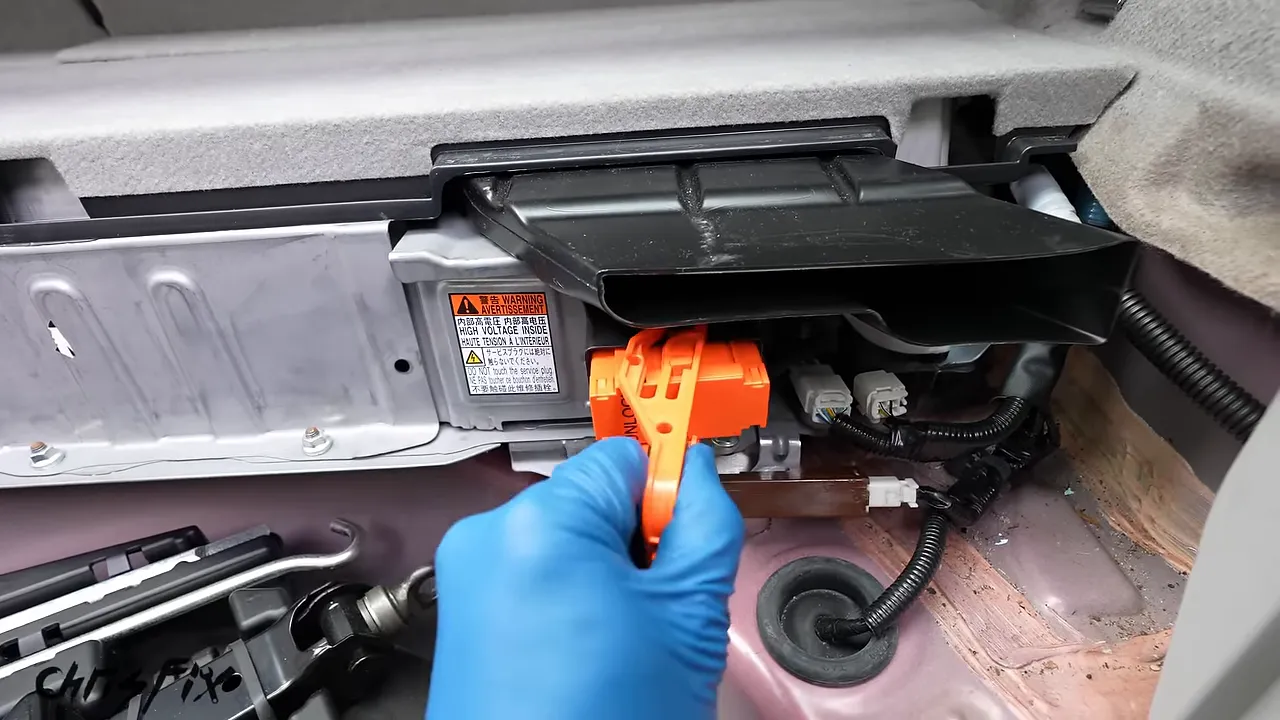
Next, remove the small tray and access panel covering the 12V battery. Loosen its negative cable with a 10mm wrench, disconnect it, and position it so it cannot spring back onto the terminal.
On the opposite side of the cargo area, remove the storage lid, unscrew the plastic retaining nut by hand, and lift out the corner tray. Remove the retractable privacy shade and fold both rear seatbacks forward.
Find the hidden floor-panel bolt
The trim panel above the battery is clipped in, but there is also a hidden 10mm bolt accessible from the rear passenger-side door. Remove that bolt before pulling on the panel.
With the bolt out, work your fingers under the plastic edge and pull upward to release the clips. Do not force a panel that still has a fastener holding it down.
Remove the passenger-side intake trim
The narrow trim piece beside the rear seat contains the battery cooling-air intake. Press down on the seat cushion to reach the 12mm bolt deep beside the seat. Use a socket and extension, and remove the bolt carefully so it does not fall behind the cushion.
Lift the trim piece upward, then pull its upper portion outward to release it.
Clean the Battery Air Filter While You Have Access
Behind that intake trim is a small filter, if the car has one. Not every Prius came equipped with this filter, so check rather than assume.
This inexpensive part catches debris before it enters the cooling fan. A missing filter allows dust and hair into the fan, while a clogged filter restricts incoming air. Either condition can contribute to poor battery cooling.
To clean the filter used on this car:
- Release the housing from the small retaining tab.
- Carefully lift out the filter without shaking debris into the intake.
- Rinse the washable filter with running water, preferably from the clean side toward the dirty side.
- Shake off excess water and allow it to dry before reinstalling.
- Seat the filter and engage its tab with the hole in the housing.
If yours is missing, check compatibility before buying a hybrid battery air filter. Keeping the cooling system clean matters even if you are not replacing the battery.
Remove the Rear Side Panel Without Breaking Its Clips
Pop off the rear hatch threshold trim to free the edge of the large passenger-side cargo panel. Four fasteners hold that side panel in place:
- A lower cargo tie-down with a 10mm bolt.
- A cargo-net attachment removed with a Phillips screwdriver.
- A plastic fastener beneath the seatbelt.
- A second cargo tie-down with a 10mm bolt.
Remove those fasteners, then peel back enough weatherstripping to reach behind the panel. Pull at the plastic clip mounting points, not just the fabric-covered material. Work along the top, releasing the clips one at a time. Open the seatbelt guide so the belt can slide out, then remove the panel.
Somebody had already been inside my car, and one clip mount had been torn off the panel. I also found unusual material on the battery housing and later discovered a missing safety fastener. Those clues are a good reminder to inspect previous work carefully.
Repair a detached trim clip before continuing
If a clip mount is detached, repair it now so the adhesive has time to cure while you work on the battery.
I mixed a strong two-part epoxy on a nonporous surface until the color was uniform. Then I worked it into the panel material, placed the clip mount in its original orientation, and clamped it firmly. Follow the adhesive’s working and curing times rather than assuming it is ready as soon as it feels hard.
Disconnect the Battery From the Car
Remove the ducts and junction-box cover
Release the retaining clip for the black vent above the battery and lift the vent away. Remove the white plastic cover by releasing its retaining clips.
The metal junction-box cover underneath uses five 10mm nuts and an orange safety fastener. Some nuts sit deep inside the assembly, so an extension and magnetic pickup tool help.
The orange service plug doubles as a tool for the safety fastener. Its small peg fits into the fastener; turn it roughly a quarter turn to release it. This design requires the service plug to be removed before the cover can be opened.
Put the five nuts and orange fastener in a labeled bag. I use a note card with the component name and hardware count. It takes a few seconds now and makes reassembly much easier.
Verify isolation before touching the output connections
Under the cover is the battery junction box. The two heavy output cables carry battery power toward the inverter in the engine compartment.
Before removing these cables, complete the prescribed waiting period and voltage checks with correctly rated equipment. In this repair, the output measurement was effectively zero after isolation. Again, that reading applies to the tested connections, not every terminal inside the battery.
Remove the two 10mm terminal nuts, disconnect the cables, and secure and protect the cable ends according to the service procedure. Thread the nuts back onto their studs temporarily so they do not get lost.
Disconnect the remaining ducting and wiring
- Release the clip securing the black duct between the cooling fan and battery, then remove the duct.
- Release the harness-retaining clips attached to the battery case.
- For the squeeze-style clip, use needle-nose pliers to compress the retaining tabs.
- Depress the locking tabs and disconnect the three electrical connectors.
- Move the wiring clear of the battery’s removal path.
Do not pull on the wires themselves. Release the lock and pull on the connector body.
Unbolt and Remove the Battery Assembly
Six 12mm hold-down bolts secure the battery assembly: two along the accessible front edge and two in each rear corner.
Pay attention to the corner bolts. The shorter bolts go through the rear-seat brackets. Keep their positions identified for installation.
Once all six bolts are out, bag and label them. Place cardboard beneath the battery’s removal path so the metal housing can slide without scraping the cargo area.
This assembly weighs about 90 pounds. A helper is the better choice for lifting it. I moved mine by easing one side outward, then the other, before lifting it onto a sturdy work surface. Be careful around the housing’s sharp edges.
If you are installing a complete replacement assembly, the internal rebuild sections do not apply. Follow the replacement supplier’s instructions and continue with installation and reconnection.
Disassemble the Original Battery Pack
The following internal procedure is specific to the cylindrical conversion kit used here. Different kits can have different layouts, hardware, wiring, and torque requirements.
Remove the lid and original busbar assemblies
The main metal lid uses four 10mm nuts on each side, eight total, plus an orange safety fastener. Mine was missing that fastener, so I obtained a replacement before reassembly.
With the lid removed, the original prismatic modules are exposed. The small internal electrochemical cells are grouped into these modules; replacing the complete set avoids mixing the old modules with the new assemblies.
- Release the busbar covers along one side.
- Remove the 28 terminal nuts with an 8mm socket.
- Lift the busbar assembly clear.
- Repeat on the opposite side, removing another 28 terminal nuts.
The new kit uses replacement terminal bolts, so the old terminal nuts are not reused in this conversion. Preserve the original hardware only where the supplier specifies it.
Keep the service-plug wiring connected where appropriate and set it aside for reuse. Disconnect the old busbar harness from its two junction-box connections, release the white wire holder, and unplug the orange connector at the bottom. Save the assembly until you have transferred the required orange cable from it.
Remove the temperature-sensor harness
Three temperature sensors clip to the original battery modules. Pinch each sensor’s retaining sides inward to release it. Remove and save the white wire holders as well.
Release the harness retainers near the electronics. Temporarily unplug the upper connector if necessary to reach the temperature-sensor connector beneath it. There is also a fourth sensor mounted down in the case. Release it, then remove the complete harness.
Separate the battery frame from the case
Carefully turn the assembly over on a suitable work surface. Remove the underside bracket’s eight fasteners, then lift the bracket away.
You can now reach the 28 case-to-battery bolts, 14 along each side. Break them loose with a ratchet. On these bolts, a Phillips screwdriver can spin them out after they are loosened.
Save all 28 because they are reused. Lift the case away, leaving the old modules in their compression frame.
Support the frame with a piece of wood for clearance. Remove the four 12mm end-plate bolts and take off the end plate. Slide the old modules out of the frame.
Keep the old modules and designated return parts for the supplier’s core-return process. Package and ship them only according to the supplier’s battery-return instructions.
Install the New Cylindrical Battery Assemblies
Prepare the frame and preserve the numbered order
The new kit uses cylindrical cells rather than the original flat prismatic modules. The larger gaps around the cylinders give cooling air more room to move, but they do not eliminate the need for a clean filter and fan.
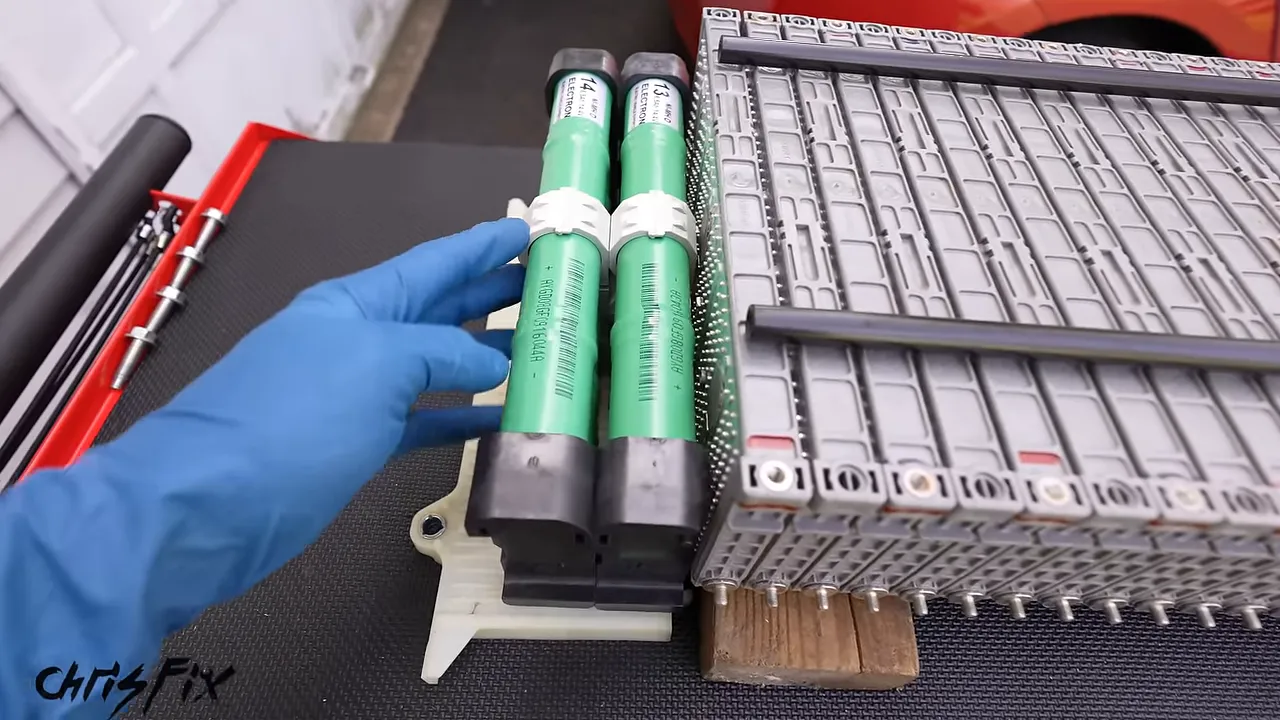
Install the four supplied protective loom sections over the frame’s metal rods. Secure the ends as directed by the kit instructions. I used electrical tape to keep the loom ends tidy and prevent them from spreading apart.
Orient the frame with its more widely spaced rods at the bottom. Keep the wood support underneath to make sliding in the new assemblies easier.
The new assemblies are numbered 1 through 14. Keep them in that sequence because they are supplied as a matched and balanced set. Handle them gently and do not drop or strike them.
After sliding them into place, check all three things:
- The numbers run from 1 through 14 in the prescribed order.
- The assemblies are centered evenly within the frame.
- The ends sit flush against one another.
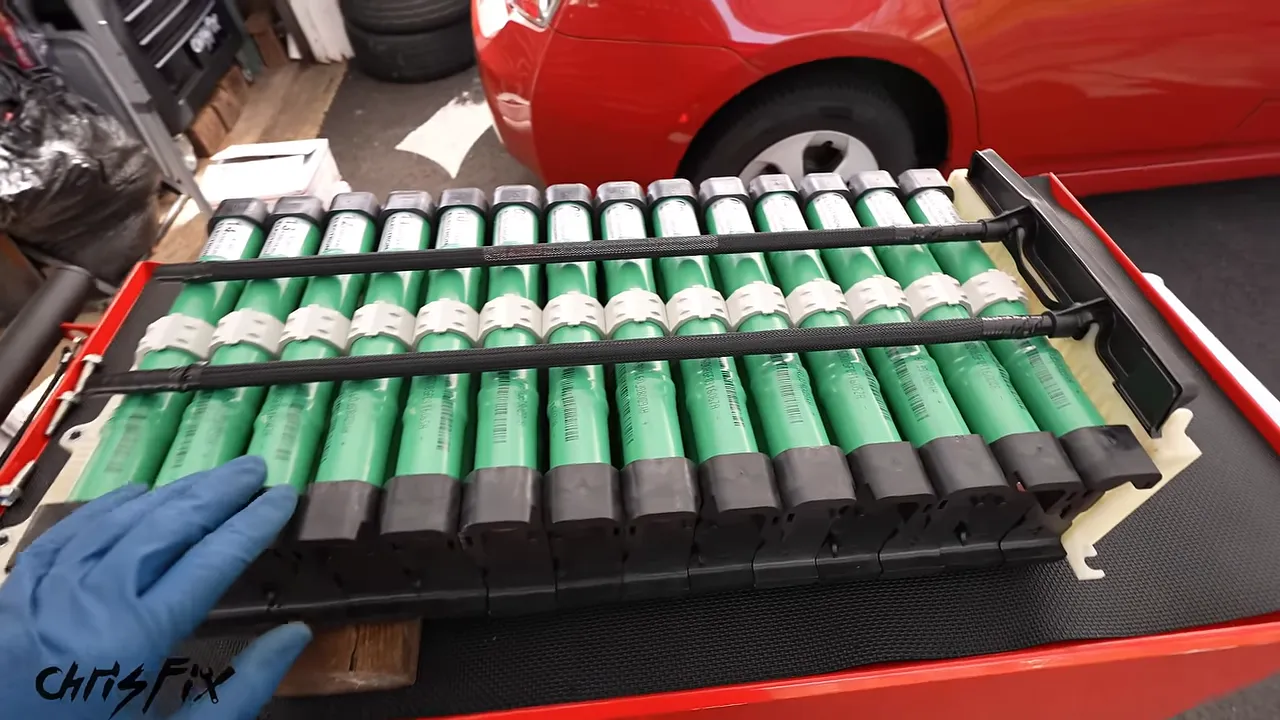
Fit the end plate with its ribbed side toward the battery. Start all four bolts by hand and torque them to 23 ft-lb for this kit.
Reattach the case
Turn the battery frame so its case-mounting holes face upward. Lower the case into position.
The black air dam belongs at the open end of the case. The end without the black air dam faces the computer and junction-box area.
Shift the case gently until the mounting holes line up. Start all 28 bolts by hand before tightening any of them fully. Once everything is aligned, torque them to 54 in-lb, not ft-lb.
Reinstall the underside bracket and its eight fasteners, then torque those fasteners to 66 in-lb. Carefully turn the assembly upright again.
Connect the Busbars, Voltage-Sensing Wires, and Main Cables
The busbars connect the battery assemblies in series. Each new assembly measured roughly 15.7 volts in this project, giving approximately 220 volts across the full series string. This is why exposed terminals require proper high-voltage precautions even with the service plug removed.
Fit the new busbars loosely
Install the supplied busbars with the new terminal bolts, but leave them loose enough to add the voltage-sensing terminals.
Not every position gets a busbar:
- The service-plug connection leaves a deliberate break for its two orange wires.
- The two output ends receive the orange main cables instead of busbars.
Use the kit’s exact connection diagram. Do not choose terminal positions by appearance alone.
Route the voltage-sensing harness away from sharp edges
The voltage acquisition harness lets the battery computer monitor the battery sections. Plug its orange connector into the computer and seat the harness in its lower wire holder.
The shorter harness branch stays on the nearer side. The longer branch wraps around to the opposite side.
Route the longer branch through the white protective wire guide. Running it directly over the nearby metal bracket creates a chafing point. Tuck it behind the computer and around the corner as intended.
Transfer and connect the orange cables
Reconnect the short orange cable to its junction-box connection and route it through the white holder to the first battery assembly.
Release the longer orange cable from the old busbar carrier, reconnect it to its corresponding junction-box connection, and route it through the holder to the far end of the battery.
Add the voltage-sensing ring terminals to their specified busbar connections. Keep the placement consistent along each side and keep the wires directed downward so they do not twist as the bolts tighten.
For this kit, each busbar gets one voltage-sensing connection, with the end connections and service-plug wiring arranged according to the supplied diagram. The service-plug wires complete the designated interruption point when the plug is later installed.
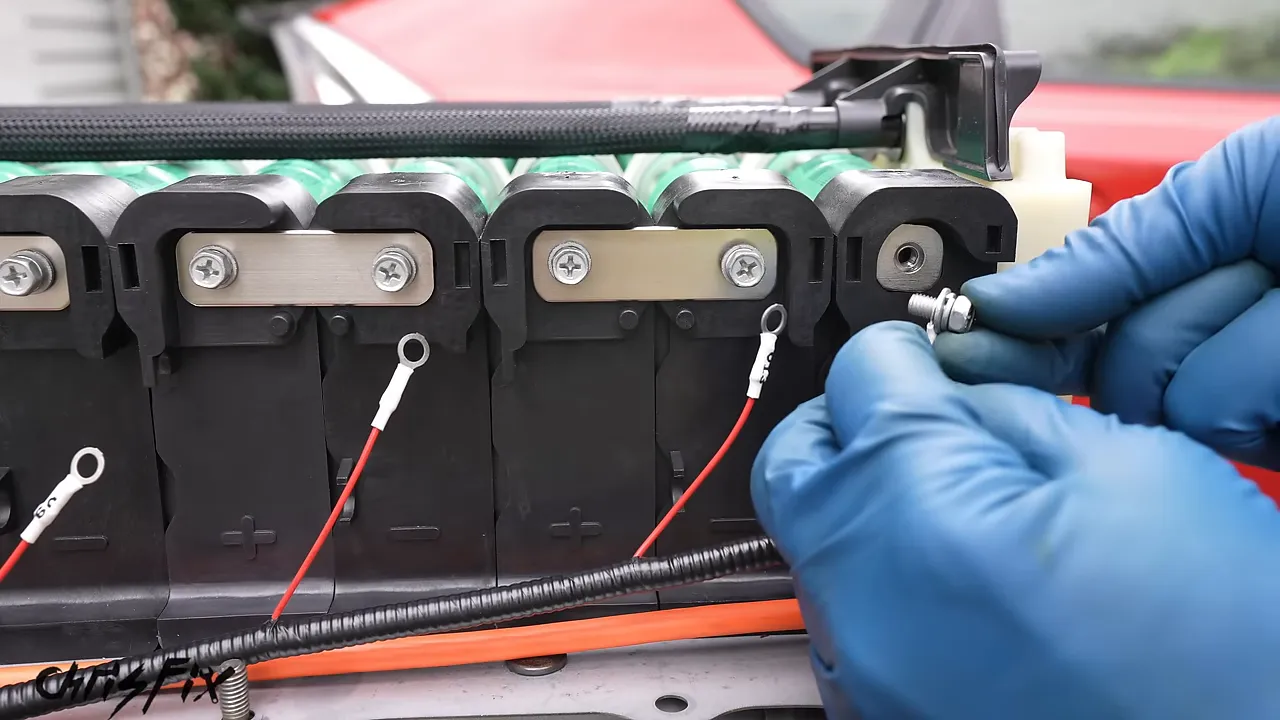
Torque the terminal and busbar bolts to 54 in-lb for this installation. Tuck the sensing harness into its channel beneath the busbars and the orange cable into its own channel.
Snap every busbar cover into place. Repeat the wiring, torque check, and cover installation on the opposite side. Before moving on, make sure no connection was missed and no wire is trapped under a cover.
Reinstall the Temperature Sensors and Battery Lid
On this conversion kit, the three battery-mounted temperature sensors go on assemblies 2, 8, and 13.
Gently compress each sensor’s spring clip and push it into its intended position until it snaps into place. Reuse the white wire holders on the metal rail to keep the harness organized.
Install the fourth sensor in its original case location. Reconnect the white temperature-sensor connector to the lower computer connection, secure the harness, and reconnect the upper connector removed for access.
Now install the metal lid:
- Fit all eight retaining nuts, four per side.
- Torque the nuts to 66 in-lb.
- Reinstall the orange safety fastener, replacing it if missing.
Do a final visual check before closing everything up. The wiring should be protected, the busbar covers seated, and the sensors secured.
Inspect the Cooling Fan Before Installing the Battery
A new battery needs good airflow. Check the fan inlet and blades before putting the assembly back into the car.
My fan was clean because the filter had caught the debris. For comparison, I picked up a junkyard Prius fan from a car without a filter, and it was packed with dust and hair.
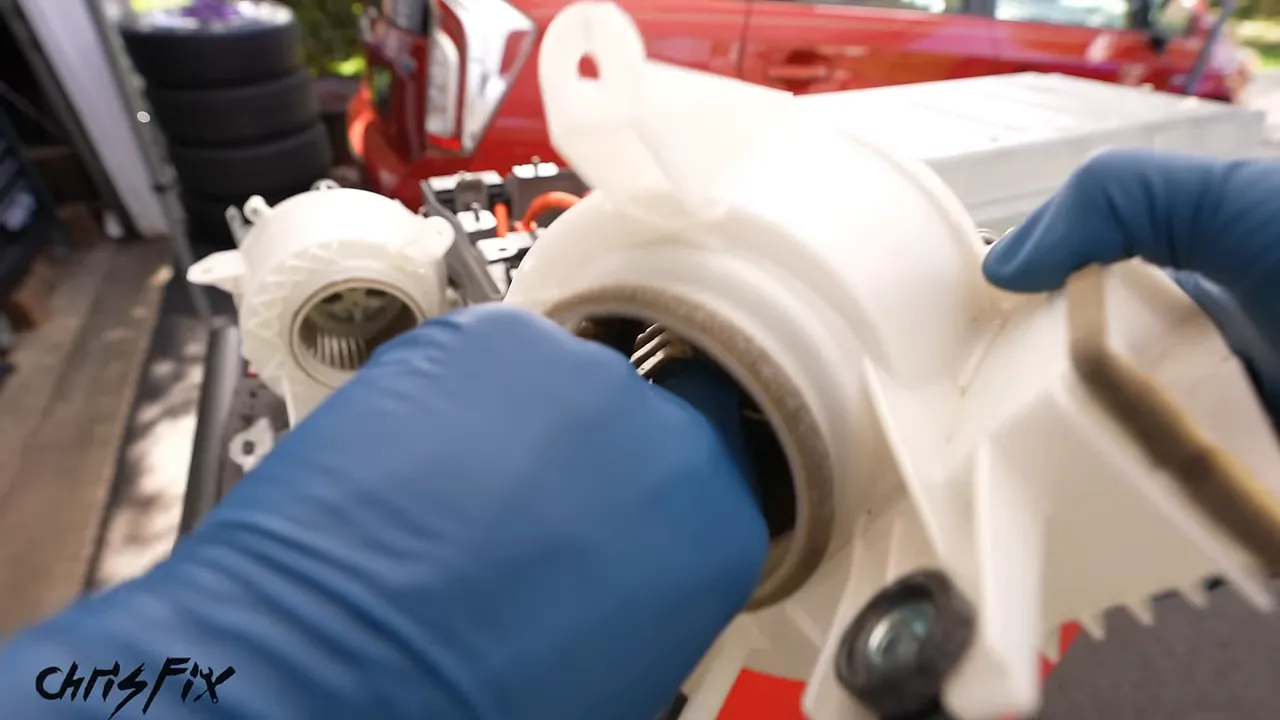
For cleaning, do not get water into the fan motor. Do not let compressed air spin the fan freely. Hold the fan stationary if using air, or use a vacuum and an appropriate cleaning method. The battery supplier also offered a cleaned fan through a core exchange.
Install the Rebuilt Battery in the Prius
Carefully lift the assembly into the cargo area, preferably with a helper. Use the cardboard to slide it into position, then remove the cardboard before fastening it down.
- Align the six battery mounting holes.
- Apply medium-strength threadlocker as specified for this installation.
- Start all six bolts by hand.
- Put the shorter corner bolts through the rear-seat brackets.
- Torque all six hold-down bolts to 14 ft-lb.
Reconnect the two inverter-output cables at the junction box. Start their nuts by hand and torque them to 80 in-lb.
Reconnect the three electrical plugs, making sure each lock clicks into place. Refit the junction-box cover, install its five nuts, and torque them to 66 in-lb. Reinstall the orange safety fastener.
Test the Battery Before Reinstalling All the Trim
With the battery secured, all electrical covers installed, and the safety fasteners in place, perform the prescribed reconnection sequence.
The service plug has an important final locking movement. Push it into its socket, close the lever, then slide the handle fully into the locked position. The Unlock marking should no longer be visible. If the handle is not fully seated, the car will not operate correctly.
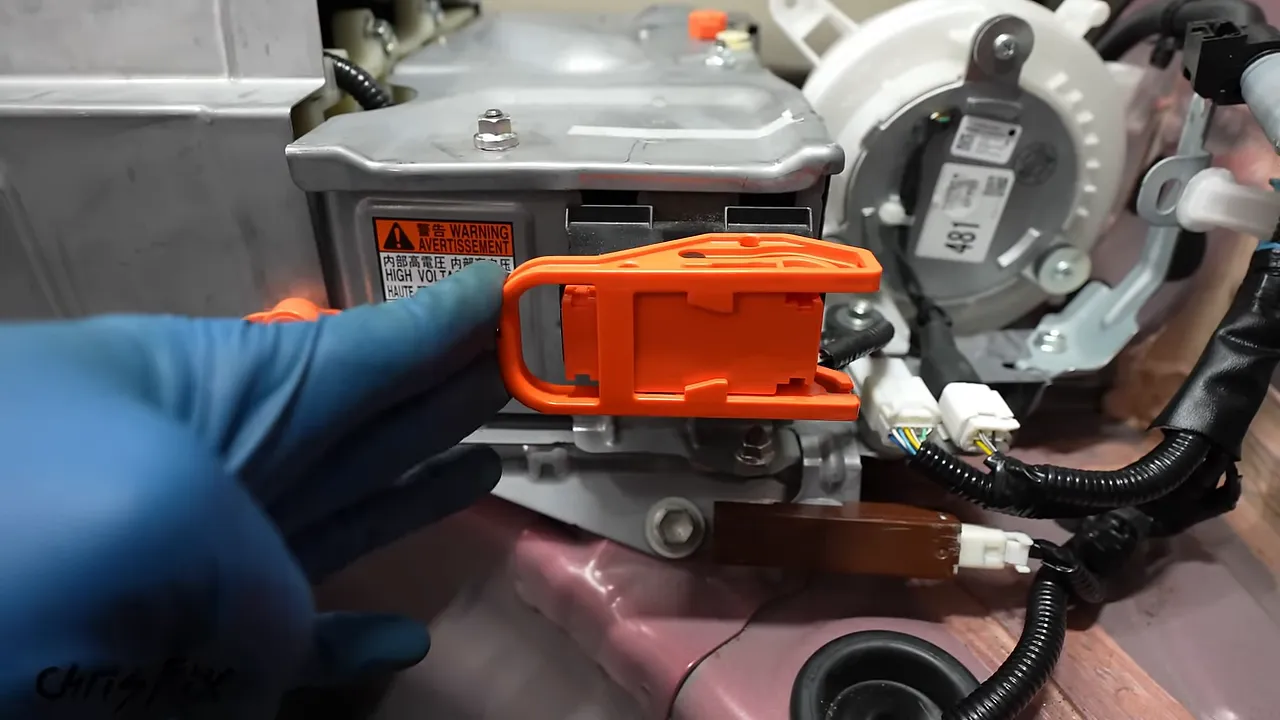
Reconnect and secure the 12V battery negative cable. With your foot on the brake, press the start button and check for normal operation.
On my Prius, the battery relays clicked, the engine started, and the dashboard showed no hybrid-system warning. The energy display showed the engine charging the battery. Once the battery had sufficient charge for the conditions, the engine shut off normally.
That was a good initial result. Shut the car down before continuing. I removed the service plug again before working around the battery to finish the trim installation, following the isolation procedure as needed.
Reinstall the Ducts and Interior Panels
Restore the cooling-air path before driving the car. The fan, filter, and ducting need to work together.
- Push the wiring-harness clips back into their mounting points on the battery.
- Reinstall the fan duct and its retaining clip.
- Snap the white plastic cover into both retaining points.
- Reinstall the black upper battery vent.
- Check that the filter and intake path are correctly seated and unobstructed.
Remove the clamps from any repaired trim clip after the epoxy has fully cured. Position the large side panel, route the seatbelt correctly, and work around the panel until its clips are seated. Restore the weatherstripping and hatch threshold trim.
Reinstall the four side-panel fasteners: the two cargo tie-downs, cargo-net attachment, and plastic fastener beneath the seatbelt.
A simple trick for the deep seat-side bolt
Set the narrow intake trim into position and push downward to engage it. Its 12mm bolt is deep beside the seat, where it can easily fall out of a socket.
A small piece of electrical tape across the socket opening makes the bolt fit more snugly. Push the bolt fully into the socket, guide it into the hole, and tighten it carefully.
Reinstall the trim panel above the battery and engage all its clips. Do not forget the hidden 10mm bolt accessible from the rear passenger-side door.
Return the seatbacks upright and reinstall the privacy shade. Complete the final service-plug and 12V reconnection procedure, confirming that the plug is fully locked and the negative terminal is secure.
Finish with the access covers, corner trays and lids, large cargo storage tray, floor lid, and trunk liner. Just like that, the interior is back together.
Torque Settings Used in This Repair
These are the settings used on this Prius with this specific conversion kit. Verify them against Toyota’s service information and the current kit instructions before applying them to your repair.
- Battery-frame end-plate bolts: 23 ft-lb.
- Case-to-battery bolts, 28 total: 54 in-lb.
- Underside bracket fasteners: 66 in-lb.
- New busbar and terminal bolts: 54 in-lb.
- Main battery-lid nuts: 66 in-lb.
- Battery hold-down bolts, six total: 14 ft-lb.
- Inverter-output cable nuts: 80 in-lb.
- Junction-box cover nuts: 66 in-lb.
Check the units every time you adjust the wrench. Inch-pounds and foot-pounds are not interchangeable.
Test-Drive Results and Total Repair Cost
For the road test, I drove a little over 20 miles to the beach. The route included highway driving, city driving, and elevation changes.
I deliberately drove for fuel economy by anticipating stops, coasting where appropriate, using regenerative braking, and allowing electric operation when conditions permitted.
The car felt smooth and had plenty of power. The sensation I had previously described as transmission slipping was gone, and the engine’s shutdown vibration had disappeared. Those were observations on this car, not proof that every similar symptom on another Prius comes from the battery.
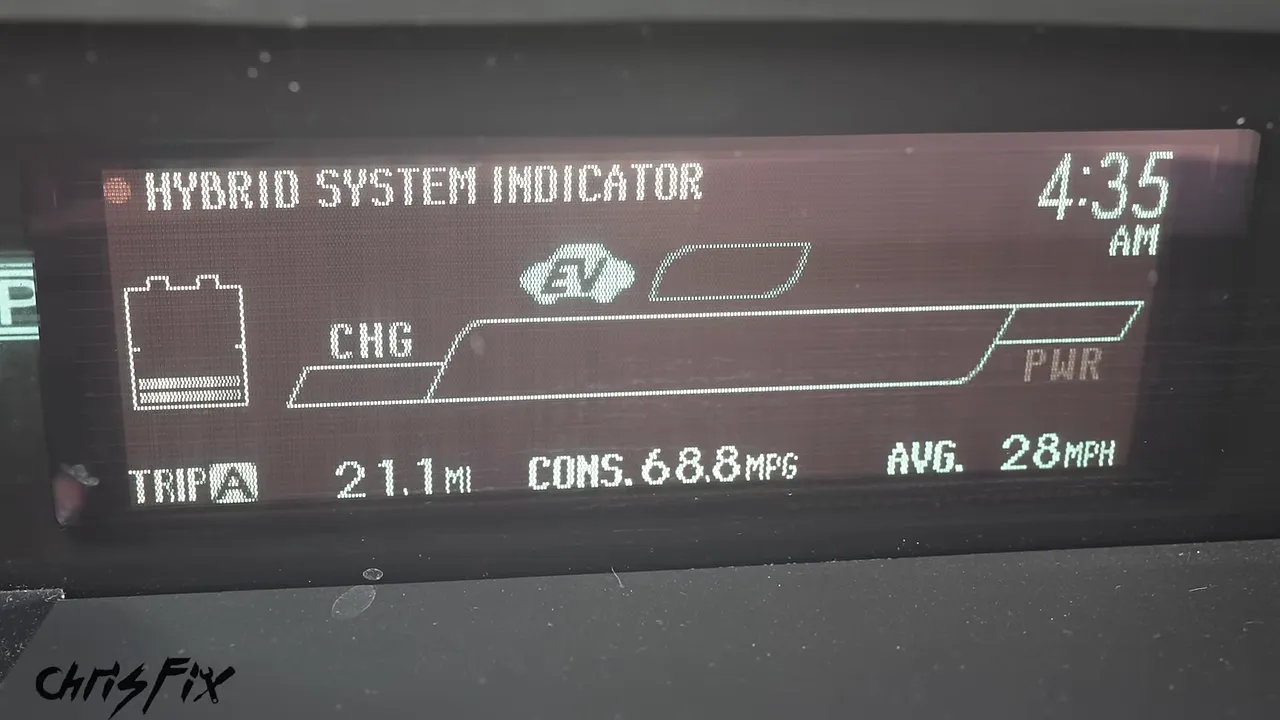
The trip display showed 68.8 MPG, just under 70 MPG. That is an unusually good result from a short, economy-focused drive. A more realistic general expectation discussed for this Prius was around 40 to 50 MPG, depending on conditions.
A follow-up scan showed no remaining trouble codes. Between the clean scan, normal dashboard behavior, and improved operation, the repair had achieved what we wanted.
Here is what I had invested in the project:
- Car purchase: $2,700.
- New hybrid battery kit: $2,200.
- Hubcaps, cleaning supplies, and miscellaneous items: About $100.
- Total: About $5,000.
I estimated the finished car could sell for about $8,000, possibly $9,000 with the right buyer. That was an estimated value, not a completed sale or guaranteed profit.
The big lesson is simple: a failed hybrid battery can be repairable without scrapping an otherwise useful car. Diagnose it first, choose quality replacement parts, keep every fastener organized, protect the cooling system, and never compromise on high-voltage safety.
|


