A clean dash camera installation does more than hide the wires. It keeps the camera out of your line of sight, protects the wiring from damage, and, most importantly, keeps those wires out of the way of your airbags.
I'm going to walk through two complete setups: a basic front camera hardwired into a truck, and a front, cabin, and rear camera system powered by a cigarette lighter adapter in a car with side curtain airbags. I'll also cover an OBD2 power adapter as a third option. You can apply these same principles to other dash camera brands, but the exact connectors, trim clips, and settings will vary.
This is a driveway job you can do with common hand tools. The trick is to plan the route, verify your power connections, and test everything before putting the interior back together.
What You'll Learn
- Verify constant power, switched power, and a real chassis ground before hiding hardwire kit connections.
- Secure camera cables outside airbag deployment paths rather than blindly tucking them behind pillar trim.
- Route rear-camera wiring through protected lower channels and the factory hatch boot.
- Test camera images, power behavior, and parking mode before completing interior reassembly.
Table of Contents
- Why a Dash Camera Is Worth Installing
- Choose Your Power Method and Gather the Tools
- How to Hardwire a Dash Camera
- Mount the Front Camera Without Blocking Your View
- Hide the Front Cable and Set Battery Protection
- How to Route Dash Camera Wires Safely Around Airbags
- Get a Clean Installation with the Cigarette Lighter Adapter
- How to Run the Rear Camera Cable
- Test Everything Before Reinstalling the Interior
- Another Power Option: An OBD2 Dash Camera Adapter
- A Factory-Clean Result Starts with Safe Routing
Why a Dash Camera Is Worth Installing
After an accident, a recording can make a big difference when people disagree about what happened. Tad's camera recorded another driver pulling into his lane in front of his Hummer H1. When the other driver's insurer tried to assign him partial fault, the footage helped establish that the other driver was responsible.
Kevin had a similar experience. Another driver claimed Kevin was speeding and had swerved into his lane, but the recording showed Kevin maintaining his lane through a green light. A dash camera can help somebody else, too. George recorded a collision and gave the footage to the pickup driver, helping clear that driver of fault.
With a suitable power supply and parking mode, the protection can continue after you park. Caesar's impact-triggered recording captured the plate of a truck that hit his parked car. Oscar used motion detection with his car backed into its parking spot to record someone trying vehicle door handles.
And it isn't all bad news. Cameras have also captured a meteor crossing the sky and an incredible near miss involving a red-light runner, two cars, and a cyclist. The important part is having the camera installed and working before you need it.
Choose Your Power Method and Gather the Tools
There are three power options covered here:
- Hardwire kit: Connects to the interior fuse box and a chassis ground. A compatible kit can support parking mode and provide low-voltage battery protection.
- Cigarette lighter adapter: Usually included with the camera. You can hide almost all the cable without making fuse box connections.
- OBD2 power adapter: Plugs into the vehicle's diagnostic port, providing another way to power a compatible camera.
For these installations, I'm using a Vantrue E1 for the basic setup and a Vantrue N4 Pro for the front, cabin, and rear setup. Vantrue supplied the cameras and supported this project. The installation principles matter more than the brand. For camera comparisons, the reviews from Linus Tech Tips and The Hook Up are useful starting points.
Tools and supplies
- Dash camera, mount, and compatible power cable
- High-endurance memory card supported by the camera
- Hardwire kit and correctly sized fuse taps, if hardwiring
- Multimeter with a DC voltage setting
- Plastic trim tool, pliers, and suitable hand tools for fasteners
- Zip ties, adhesive wire clips, and flush cutters
- Alcohol and a microfiber towel for cleaning the mounting area
- Wire snake or fish wire and electrical tape for the rear cable
- Rubber-compatible silicone spray for a tight hatch wiring boot, if needed
- Optional compatible polarizing filter
Use a high-endurance memory card. Dash cameras repeatedly write new recordings and overwrite older files. High-endurance cards are designed for this workload and the hot conditions inside a car. Check the camera's supported capacity rather than buying a card based on size alone.
A polarizing filter is another useful extra. It can reduce dashboard reflections in the windshield, but it needs to be adjusted after the camera is mounted.
Before removing trim near an airbag, consult your vehicle's service information, including its required electrical isolation procedure. The Prius trim removal described below is an example, not a universal procedure. If you cannot identify a safe route around the restraint system, have a qualified installer handle that portion. The NHTSA airbag safety resource provides additional background on these safety systems.
How to Hardwire a Dash Camera
1. Find the interior fuse box
Your owner's manual is the best place to start. Common locations include the side of the dashboard near the driver's door, underneath the driver's side dashboard, or below the glove box on the passenger side.
In this truck, the fuse box is behind a cover on the driver's side of the dash. Keep the fuse diagram handy, because finding a circuit with power is only half the job. You also need to know what that circuit protects.
2. Identify the hardwire kit's connections
This kit has three vehicle-side wires:
- Red, battery positive: Requires constant power, including when the ignition is off.
- Yellow, accessory: Requires switched power, with no voltage when the vehicle is off and voltage when the ignition is in the appropriate accessory or run position.
- Black, ground: Connects to a sound chassis ground.
Follow the labels and instructions supplied with your kit. Do not assume another kit uses the same wire colors.
3. Test for constant power
With the vehicle off, set the multimeter to DC volts, identified by a V with a straight-line symbol. Attach the black lead to a known bare-metal ground. An alligator clip makes this easier and frees up a hand.
Touch the red probe to one of the small exposed test points on top of a fuse. On an intact powered fuse, you should find battery voltage at either test point.
In the truck, fuse 13 showed approximately 12 volts with the key off. Electrically, that met the constant-power requirement. But the manual identified it as the brake pedal position switch circuit, so I left it alone.
Do not tap safety-critical or essential vehicle circuits. Avoid airbag/SRS, ABS, engine or body control modules, brake-related circuits, headlights, taillights, and turn signals. A blown fuse on one of those circuits can create a much bigger problem than a camera that stops recording.
Instead, investigate suitable noncritical accessory circuits, such as the radio, power outlet, power mirrors, or power seats, while checking the vehicle and kit requirements. In this truck, the radio circuit at fuse 29 had constant power and was the circuit I used.
4. Install the constant-power fuse tap
- Remove the selected fuse using a suitable fuse puller or pliers.
- Match the fuse's physical type to the correct fuse tap.
- Install the original vehicle fuse in the tap's original-circuit position. On the tap used here, that is the slot closest to its plug-in blades.
- Make sure the dash camera branch has the fuse specified by the hardwire kit.
- Identify the supply side of the fuse box slot and orient the tap's input blade accordingly, following the tap's instructions.
- Seat the tap fully and verify power at its output.
- Connect the kit's constant-power wire securely and give the connection a gentle tug.
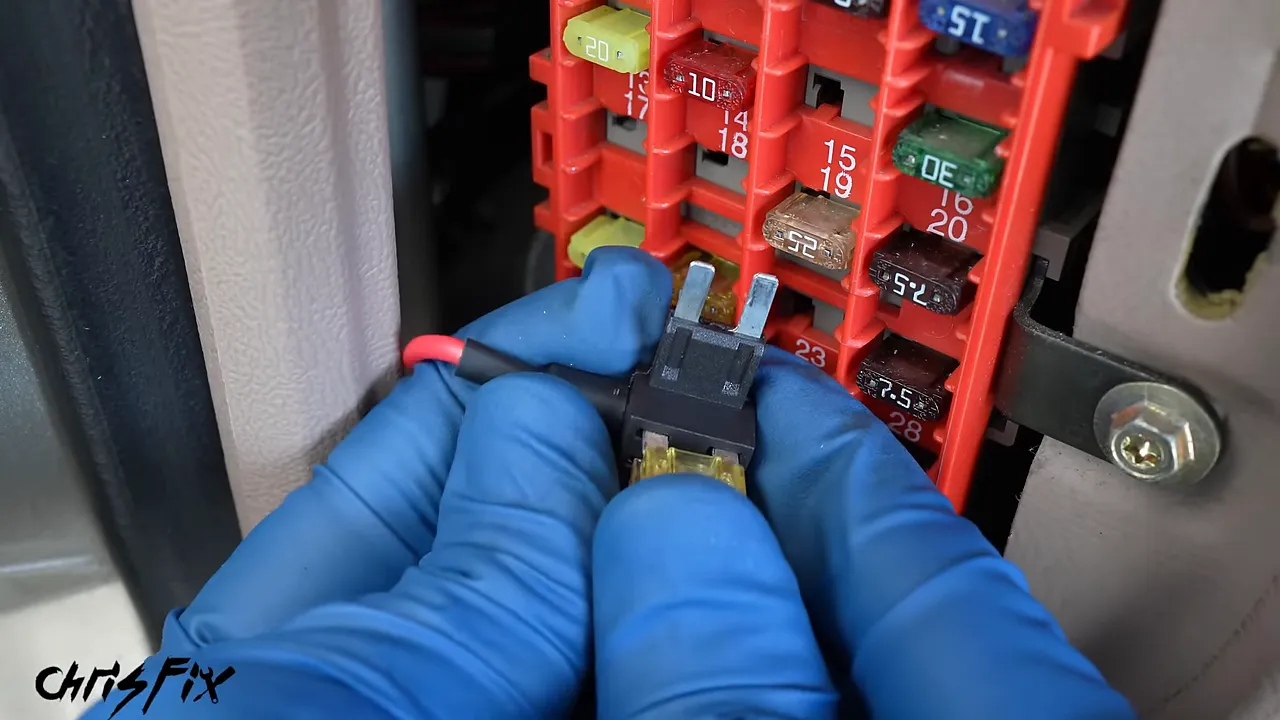
Fuse taps are directional. Installing one backward can change how the circuits are protected. The input blade must connect to the supply side of the fuse box slot, so do not choose its direction simply because the wire fits more conveniently.
5. Find and connect switched accessory power
For the accessory wire, find a suitable connection that measures zero volts with the ignition off and approximately 12 volts with the ignition on.
In this truck, the auxiliary power outlet was always powered, so it wasn't suitable for the accessory signal. Several other available circuits were too important to tap. Instead, I checked an unused position, slot 15.
An unused slot isn't automatically usable. Some have no electrical terminals, while others have only a supply terminal. Here, the slot had a terminal that measured zero volts with the truck off and approximately 12 volts in the run position.
Because there was no original vehicle circuit fuse in this position, the original-circuit position on the tap remained empty. The camera branch still needs its specified fuse. Orient the tap correctly, seat it, and test again in both ignition states before connecting the accessory wire.
6. Attach a real chassis ground
A bare-metal screw isn't necessarily a ground. One tempting screw beside this fuse box threaded into plastic. Although the screw itself was metal, it did not provide a chassis ground.
I used the verified grounding point that had already worked for the multimeter tests. Remove the suitable bolt, fit the ground terminal beneath its head, reinstall it, and tighten it securely. The terminal needs solid electrical contact with grounded metal.
7. Test before routing the cable
Connect the camera using its actual power input. On this camera, power enters through the mount, not the accessory port on the side of the camera.
Make sure the camera powers up and stays on. If it repeatedly starts and shuts off, check the ground connection early in your troubleshooting. Reseating the terminal or moving to a verified grounding point may resolve the problem.
Once the power connections work, you can mount the camera and hide the cable.
Mount the Front Camera Without Blocking Your View
The goal is a high, reasonably centered position behind the rearview mirror, usually slightly toward the passenger side. From the driver's normal seating position, the camera should be hidden by the mirror rather than sitting in the driver's field of view. Check local windshield mounting requirements, too.
Do not commit the adhesive until you have checked the camera's actual image. A location can look perfect from the seat while the mirror mount blocks part of the lens.
- Power the camera and hold it near the proposed mounting position.
- Use its display or phone app to inspect the image.
- Move it as necessary to clear the mirror mount and other obstructions.
- Clean the glass with alcohol on a microfiber towel and let it dry.
- Remove the protective film from the mounting adhesive and camera lens.
- Install the optional polarizer and the supported high-endurance memory card.
- Press the mount firmly against the clean glass.
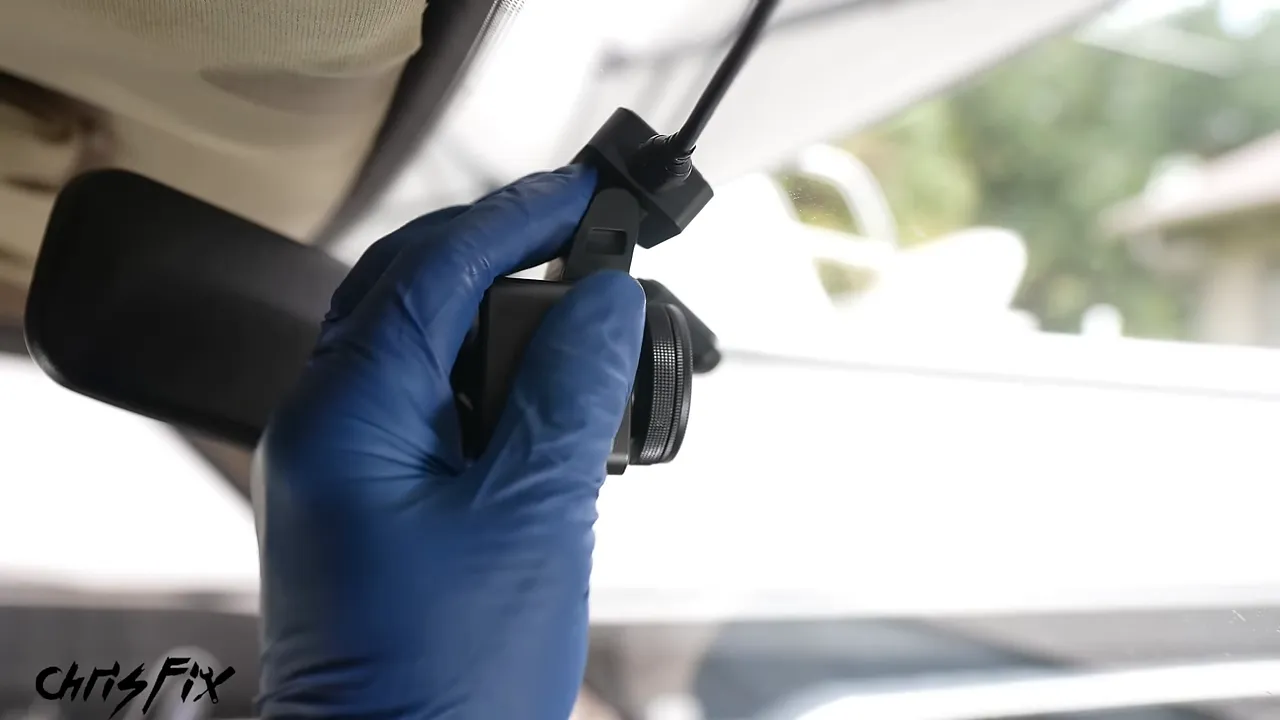
For the front-and-cabin camera, there is one extra consideration: the rearview mirror must not block the inward-facing lens. Keep the front camera tucked away without sacrificing the cabin image.
In the basic camera setup, the 256 GB card provided a little over 30 hours of recording before overwriting older files. That is an example for this configuration, not a universal recording time. Resolution, recording settings, and the number of cameras affect storage use.
Adjust the polarizing filter
With the camera mounted, look at the live image and slowly rotate the filter's outer ring. Concentrate on the dashboard reflection near the bottom of the image. Stop where the reflection is reduced most effectively.
Simply screwing the filter on isn't the final step. Its orientation is what makes the difference.
Hide the Front Cable and Set Battery Protection
Start at the camera and work toward the power source. This leaves the excess cable near the fuse box or dashboard, where there is room to organize it, rather than above the mirror.
Carefully tuck the wire above the headliner's backing board at the windshield edge. Do not push it between the fabric and its backing or pull the fabric downward. That can separate the material and leave a sagging headliner.
On an older vehicle with a loose headliner edge, an adhesive wire clip attached to the glass can keep the cable from dropping. Continue toward the A-pillar, using a plastic trim tool where needed.
The truck used here has no curtain airbag at the A-pillar, so I could tuck the cable behind the trim and work down toward the fuse box. Do not use that shortcut on an airbag-equipped pillar. The safe airbag routing procedure is covered in the next section.
At the fuse box, gather the excess cable, secure it with a zip tie, and cut the tail with flush cutters. A flush cut avoids leaving a sharp plastic edge that can scratch your hand or damage nearby wiring. Secure the bundle where it will not interfere with controls or prevent the cover from fitting.
Choose the low-voltage cutoff
The hardwire kit shown here offers 11.6-volt and 12-volt cutoff settings. I selected 12 volts, the more conservative of those two choices, to reduce battery drain during parking mode.
Low-voltage protection shuts the camera down when the battery reaches the selected threshold. It is useful protection, but it is not a guarantee that every battery will start every vehicle in every condition. Use the kit's recommended setting for your application.
Enable and test parking mode
In this camera's app, open the settings using the gear icon, then select Parking Mode. I chose collision detection and set its sensitivity to high so a small bump would trigger a recording.
After switching off the truck, the camera confirmed that it was entering parking mode. A gentle bump then woke it and started a recording a few seconds later. That verified the power wiring and parking settings together.
Other supported modes include motion detection, low-bitrate recording, and low-frame-rate recording. Choose the behavior that suits your situation, and verify what your particular camera actually records.
How to Route Dash Camera Wires Safely Around Airbags
This is the part of the installation you do not want to guess at. A wire hidden behind trim can still be in the airbag's deployment path. Blindly pushing a cable into the edge of an A-pillar cover may leave it crossing the curtain airbag.
For the Prius installation, both the power cable and the rear-camera cable travel from the front camera along the headliner to the passenger-side A-pillar. I then remove the trim so I can see and secure the route.
Remove the trim using the vehicle-specific procedure
On this Prius, I first pull back the door weather stripping, then release the A-pillar trim. A retaining strap keeps the cover from becoming a loose projectile during deployment.
The strap's hooked end releases by turning it 90 degrees with needle-nose pliers, allowing it to slide through the trim opening. Other vehicles use different retainers, and some require replacement parts after removal. Check before pulling harder.
Once exposed, leave the airbag itself alone. Do not use it, its fasteners, or its connectors as wiring supports.
Secure the wires outside the deployment path
In this car, the factory wiring harness provides a suitable route above and behind the airbag, against the body. I follow that route and secure the camera cables to the harness with several zip ties so they cannot sag across the airbag.
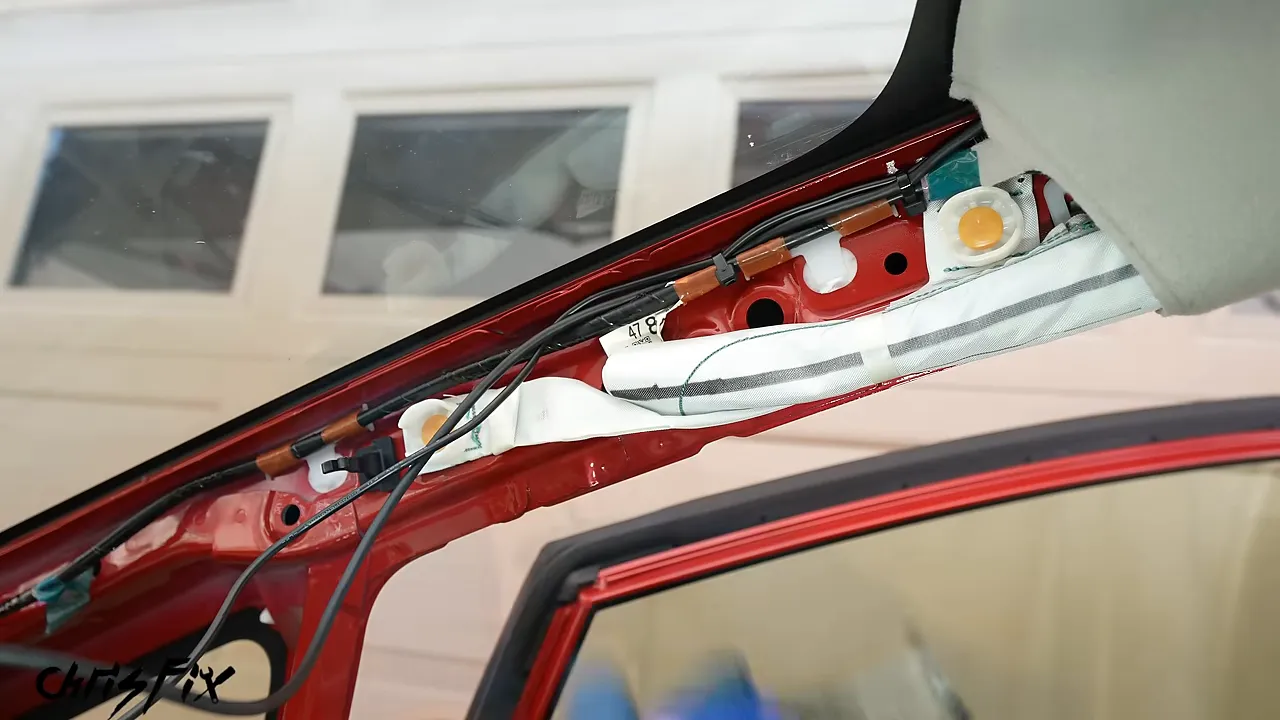
If no suitable harness is available, appropriately placed adhesive wire clips on the painted body metal can provide another way to hold the cables clear. The objective is the same: a secure route that cannot fall into the deployment path.
Run the cables down the pillar and behind the dashboard without pinching them. Check that the bottom of the trim still fits, reconnect and lock its retaining strap, then snap the cover back into position. Restore the weather stripping once the remaining cable routing is finished.
Get a Clean Installation with the Cigarette Lighter Adapter
You do not have to hardwire a camera to hide its power cable. In the Prius, I use the included cigarette lighter adapter and conceal almost the entire run.
1. Check how the outlet behaves
Plug in the adapter and verify whether it receives power with the vehicle off and on. In this car, its indicator lights with the vehicle on and goes out when the vehicle is switched off. That gives the camera an automatic on-and-off power source for normal driving.
Do not assume every outlet works that way. Some remain powered when the vehicle is off, which changes how you need to manage battery drain and camera operation.
2. Route the cable behind the glove box
After following the safe A-pillar route, separate the power cable from the rear-camera cable. Tuck the power cable between the dashboard and kick-panel trim, then route it behind the glove box toward the outlet.
On this Prius, glove box removal works like this:
- Empty the glove box.
- Disconnect its side damper.
- Press the sides inward to clear the molded stops.
- Lower the glove box carefully.
Feed the adapter and cable behind the opening. Bundle the excess and secure it to a suitable factory harness so it doesn't hang loose or interfere with the glove box.
Drop the adapter toward the outlet, reinstall the glove box and its damper, and plug it in. Tuck the final section of cable into the dashboard seam, leaving only the short length needed to reach the socket.
Beautiful. You get nearly the same tidy appearance as a hardwired installation, without making fuse box connections. The adapter used here also leaves a USB port available for charging a phone.
How to Run the Rear Camera Cable
Plan the complete route before ordering or installing the cable. The included rear-camera cable is 20 feet long, which is enough for many vehicles. This Prius needed a 30-foot cable because of the low route around the airbags and the final camera position on its hatch.
Connect the compatible rear-camera cable to the front unit, but leave enough freedom to route and test it before securing everything.
1. Follow the lower door sills
Rather than run the rear cable along the roof beside the curtain airbags, I bring it down the passenger-side A-pillar and follow the lower door sills.
- Release the front sill trim and tuck the cable behind the kick panel.
- Place the cable in suitable factory routing clips rather than laying it over sharp plastic ribs.
- Release enough lower B-pillar trim to feed the connector through.
- Remove the rear sill trim and pull the cable into the rear doorway.
- Continue along the protected routing clips toward the back seat.
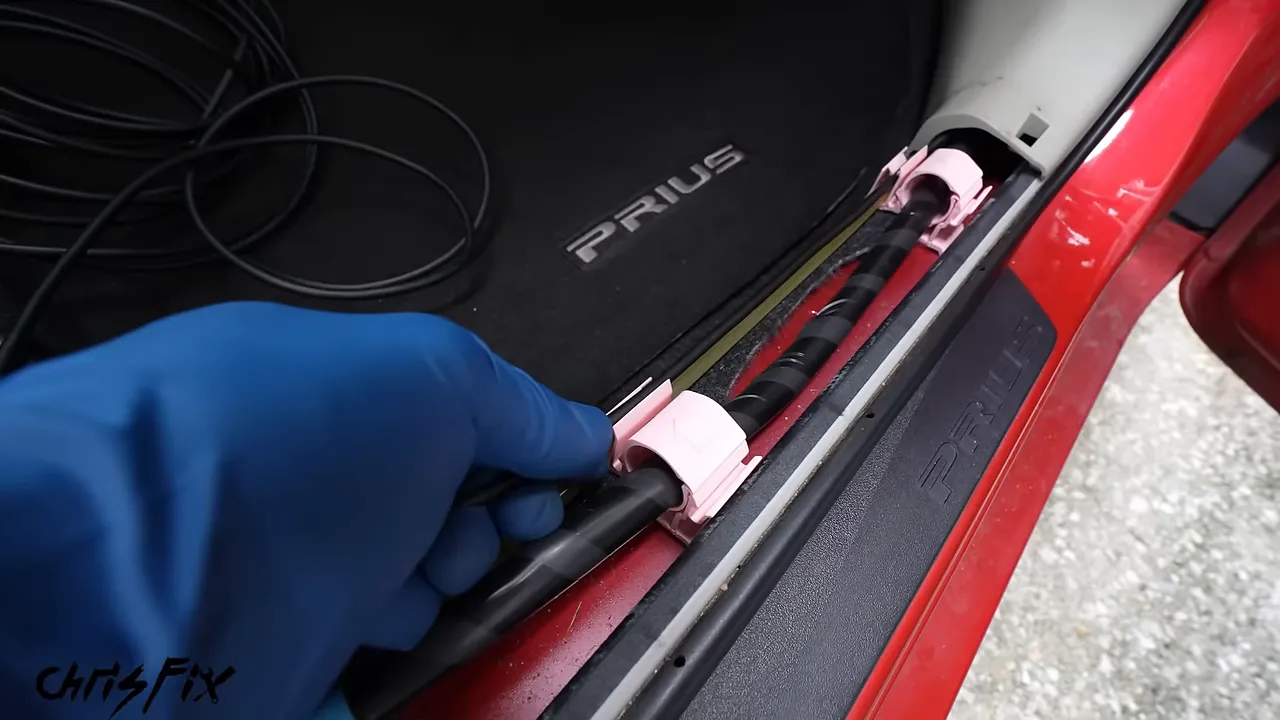
In this Prius, the rear washer-fluid hose already follows the route toward the hatch, and its clips have room to hold the camera cable. That keeps the wire organized and protected from vibration against sharp trim features.
Pull the cable through in stages, checking that it hasn't knotted or caught on anything.
2. Work around the rear curtain airbag
At the rear seat, pull back the weather stripping and route the cable behind the side trim. Do not simply take it upward across the C-pillar curtain airbag.
Here, the safer route passes through the lower rear trim into the cargo area, then rises behind the airbag area toward the hatch opening. With the necessary trim released, I can identify the route instead of forcing the cable through blindly.
3. Use a wire snake through tight spaces
A semi-rigid wire snake makes the section behind the rear trim much easier:
- Feed the snake through the confirmed clear passage.
- Tape the camera cable connector securely to its end.
- Extend the tape beyond the connector to create a smooth leading shape.
- Pull the snake back carefully, guiding the connector through rather than forcing it.
Once the cable reaches the cargo area, secure it along the suitable factory harness route to prevent it from moving toward the airbag.
4. Pass through the factory hatch wiring boot
A moving hatch needs a protected cable path between the body and hatch. Use the existing rubber wiring boot where the cable and connector can fit safely.
Carefully release both ends of the boot and route the cable beneath the headliner to the body-side opening. Feed the snake through the boot, attach the connector with tape, and pull it through gently.
This boot was tight enough that the snake resisted the bends. A small amount of rubber-compatible silicone spray inside made the job much easier. Do not force the connector against the existing wires or damage the rubber.
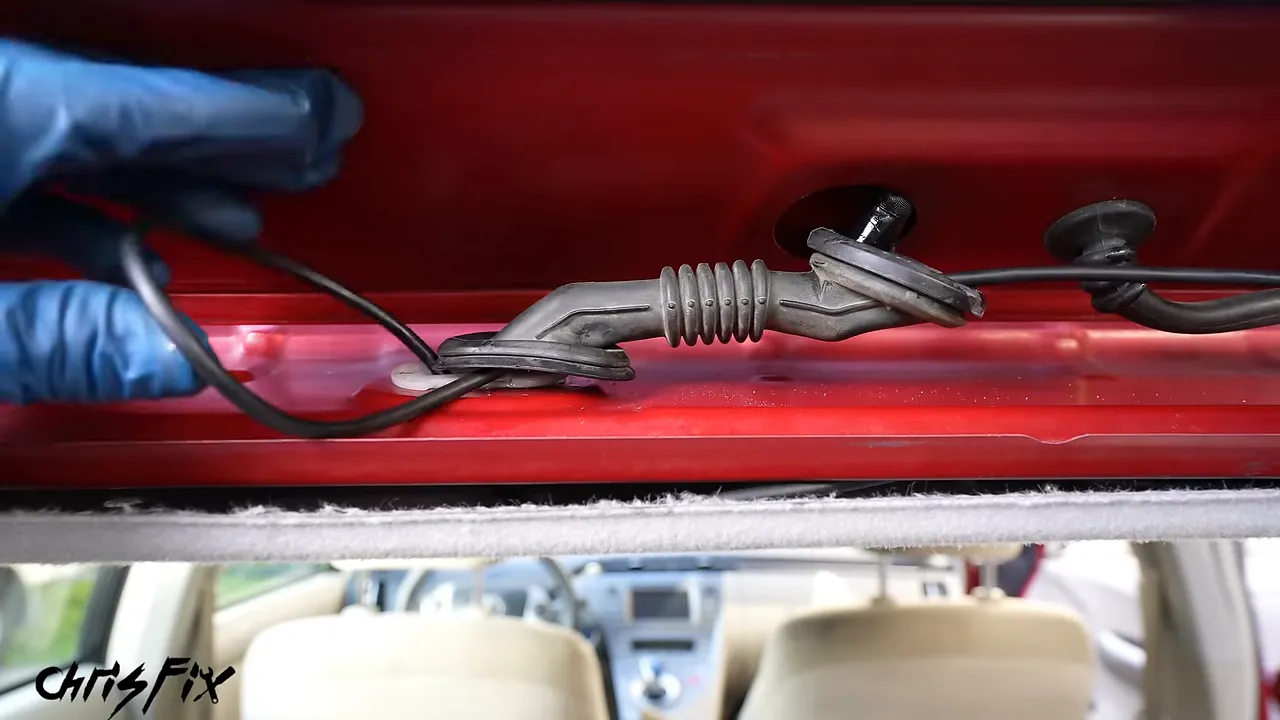
Pull through the excess without leaving the cable under tension. It needs to follow the boot's movement as the hatch opens and closes. Continue into the hatch and secure it beside the factory harness to prevent rattles and chafing.
5. Choose the rear mounting position from the actual image
For many vehicles, a camera mounted near the top of the rear window works well. The Prius has a shallow upper rear window and a spoiler, so I checked that view before deciding.
The upper position showed reflections and part of the image was blocked by the spoiler. Moving the camera to the lower, more upright rear glass gave a clearer, unobstructed view. Reaching that position required removing more hatch trim and explains why I needed the longer cable.
Run the cable beside the factory harness and secure it at intervals. To manage the excess, I followed the harness farther across the hatch and then doubled back, securing both runs rather than leaving a loose bundle.
6. Mount the camera and protect its cable exit
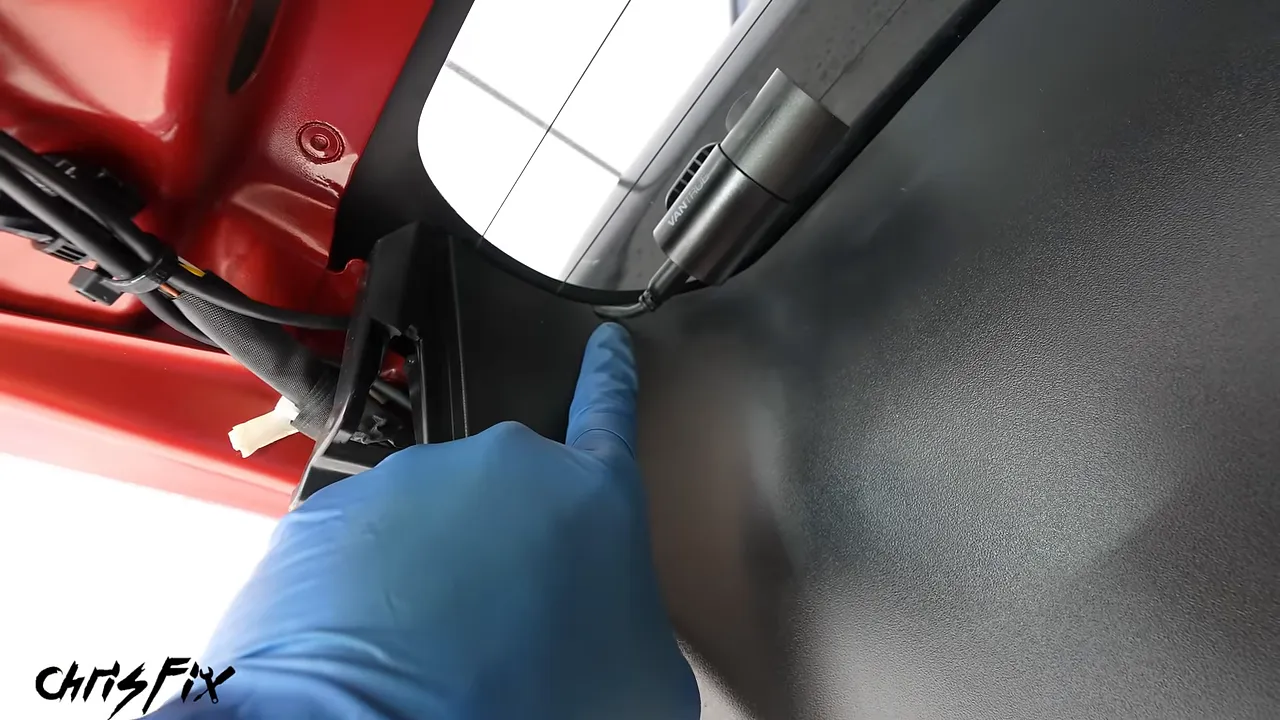
Clean the glass with alcohol, remove the adhesive film, and position the camera without placing the mount on a rear-window heating element. Plug in the cable and check the aim.
Before snapping the surrounding trim back on, check whether it presses against the cable. On this installation, the trim needed a small relief notch.
I marked the cable location, removed the trim, made the opening, and smoothed it with 180-grit sandpaper wrapped around a small screwdriver. However you form the opening, keep it controlled and check the finished edge carefully. It must be smooth enough that it cannot cut into the cable.
Test Everything Before Reinstalling the Interior
Before putting all the trim back, power up the vehicle and confirm that the rear camera works. It is much easier to correct a loose connection now than after every panel is installed.
Once the system passes that check:
- Reinstall the hatch trim and verify that no clips trap the cable.
- Reseat both ends of the rubber wiring boot completely.
- Check that the boot seals properly around any plastic mounting inserts.
- Press the hatch and door weather stripping fully back onto its mounting flanges.
- Refit the rear side trim, B-pillar trim, sill covers, and kick-panel pieces.
- Confirm that all airbag trim retainers are restored correctly.
The boot and weather stripping are especially important. An incomplete seal can let rainwater into the headliner or interior.
Finish with a short test drive
Review recordings from every installed camera after the drive:
- Front camera: Check that the image is clear, aimed correctly, and not blocked by the mirror mount.
- Cabin camera: Confirm that the mirror doesn't obstruct the interior image. This can be particularly useful for rideshare or delivery work.
- Rear camera: Check for spoiler obstruction, reflections, and a useful view of traffic behind you.
- Power behavior: Verify the intended startup, shutdown, and parking-mode operation for your chosen power supply.
Also check that the camera remains out of your normal driving view and that the installation hasn't introduced rattles. In the Prius, the lower rear mounting position produced a much better view than the upper glass.
Another Power Option: An OBD2 Dash Camera Adapter
A compatible OBD2 power adapter offers one more approach. On most U.S.-market passenger vehicles from model year 1996 onward, the diagnostic connector is usually beneath the driver's side dashboard.
Locate the port, plug in the adapter, and route its cable to the camera using the same careful wiring principles. Check vehicle compatibility and the adapter's power-management behavior before relying on it for parking operation.
It saves making fuse taps, but it doesn't eliminate the need for safe routing. The cable still needs to stay clear of pedals, moving components, sharp edges, and airbag deployment paths.
A Factory-Clean Result Starts with Safe Routing
Whether you choose a basic front camera or a complete front, cabin, and rear system, the process comes down to a few habits: verify the power source, mount the camera without obstructing your view, secure the wiring outside every airbag deployment path, and test before reassembly.
Take your time with the trim, protect the cables from chafing, and restore every seal and retainer. Done properly, nearly all the wiring disappears, the interior still looks factory, and the cameras are ready to record when you need them.


